Daily attendance
Submit a section’s daily attendance and correct a saved register with the right date and reason
Class teachers mark their assigned sections. The owner and principal can mark and correct any section. The front office reads attendance. A subject-teacher assignment alone does not grant attendance access.
Submit the day
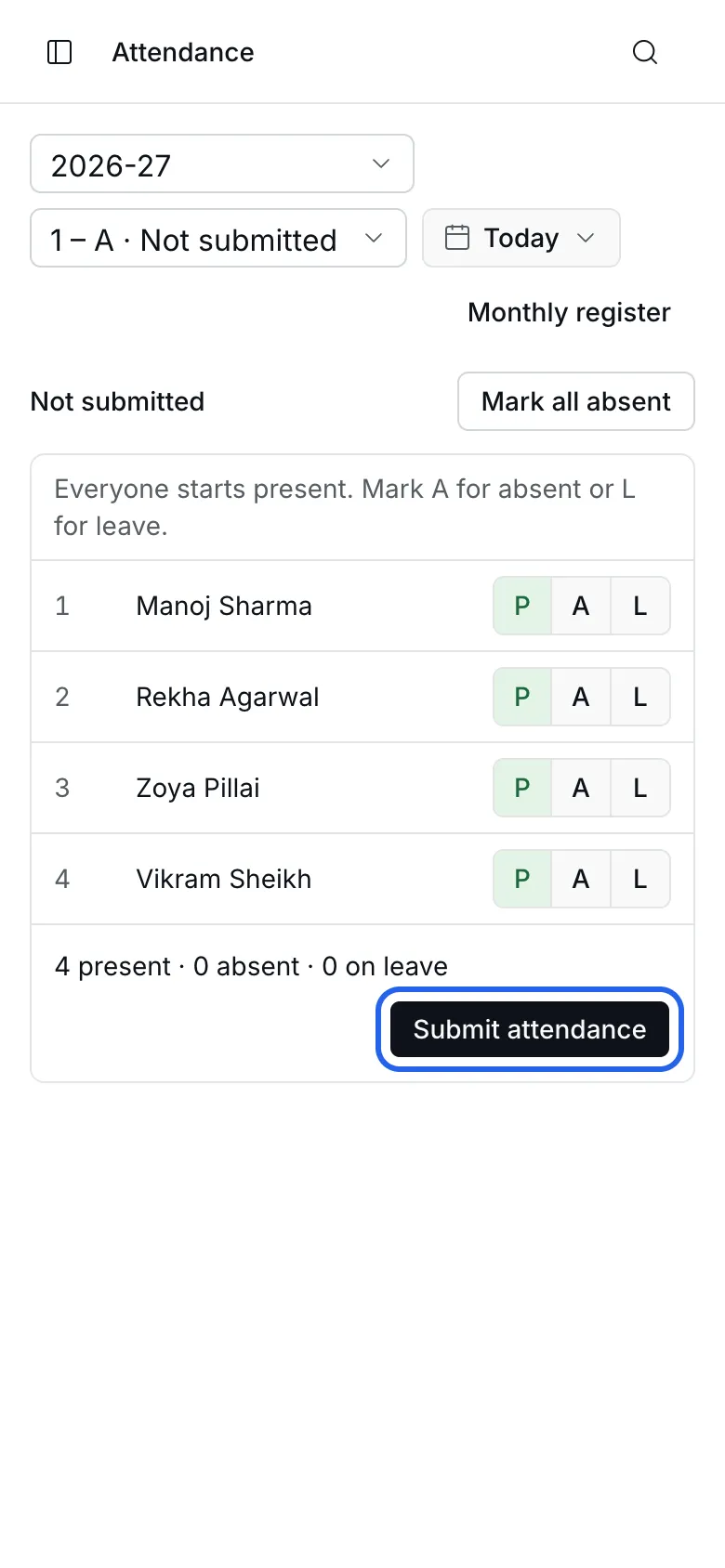
- Open Attendance. Check the academic year, section and date. Dates follow the school’s time zone and must be within the year, no later than today.
- Everyone starts present. Mark A for absent or L for leave. Check the count of present, absent and leave entries before saving.
- Click Submit attendance. The page shows who submitted the register and when.
Mark all absent and Mark all present change the draft list; they do not submit it. A reader sees Not submitted yet until someone submits. No submitted register means no recorded attendance for that day, not that every student was absent.
If a pupil moved sections today, the row shows their earlier mark and where it was saved. Submitting the new section moves that day’s mark with the pupil.
Correct a submitted register
Open the day and click Correct. Check the roster, change the entries and give a reason, then save. A class teacher can correct today’s register for their own section. Older dates require the principal or owner.
If placement changes affect already submitted days, review the named registers from the student’s class history. Those saved registers keep their original roster until corrected. If the page says the roster or register changed, reload and check it before entering the correction again.
Then read monthly registers or check absence notices.