Journals
Post a balanced debit and credit entry for depreciation, bank charges, transfers and bad-debt write-offs
A journal is a voucher (an accounting entry) you write by hand: you choose the accounts, the debits and the credits. Every entry has two equal sides: the debit and credit (Dr and Cr). Use a journal for entries that no invoice (sale), bill (purchase), receipt (money in) or payment (money out) covers. Examples are quarterly depreciation (the part of an asset’s cost used up in the period), bank charges without GST (Goods and Services Tax), a cash deposit into the bank, or a write-off of an invoice a customer will never pay.
Who can do it: your role decides this. An Owner or Accountant posts (writes into the books for good) and cancels journals. A Chartered Accountant (CA) can open and read them. An Operator does not see journals.
The journal register
Open Accounting → Journals. The register lists journals with Number, Date, Narration (narration, the note that explains the entry) and Amount (the debit total). Search by number, reference or narration. The filter icon offers Date and Status (Posted or Cancelled). By default the register shows This month.
Use Export to print or download the filtered register. See Export a list for formats, access and limits.
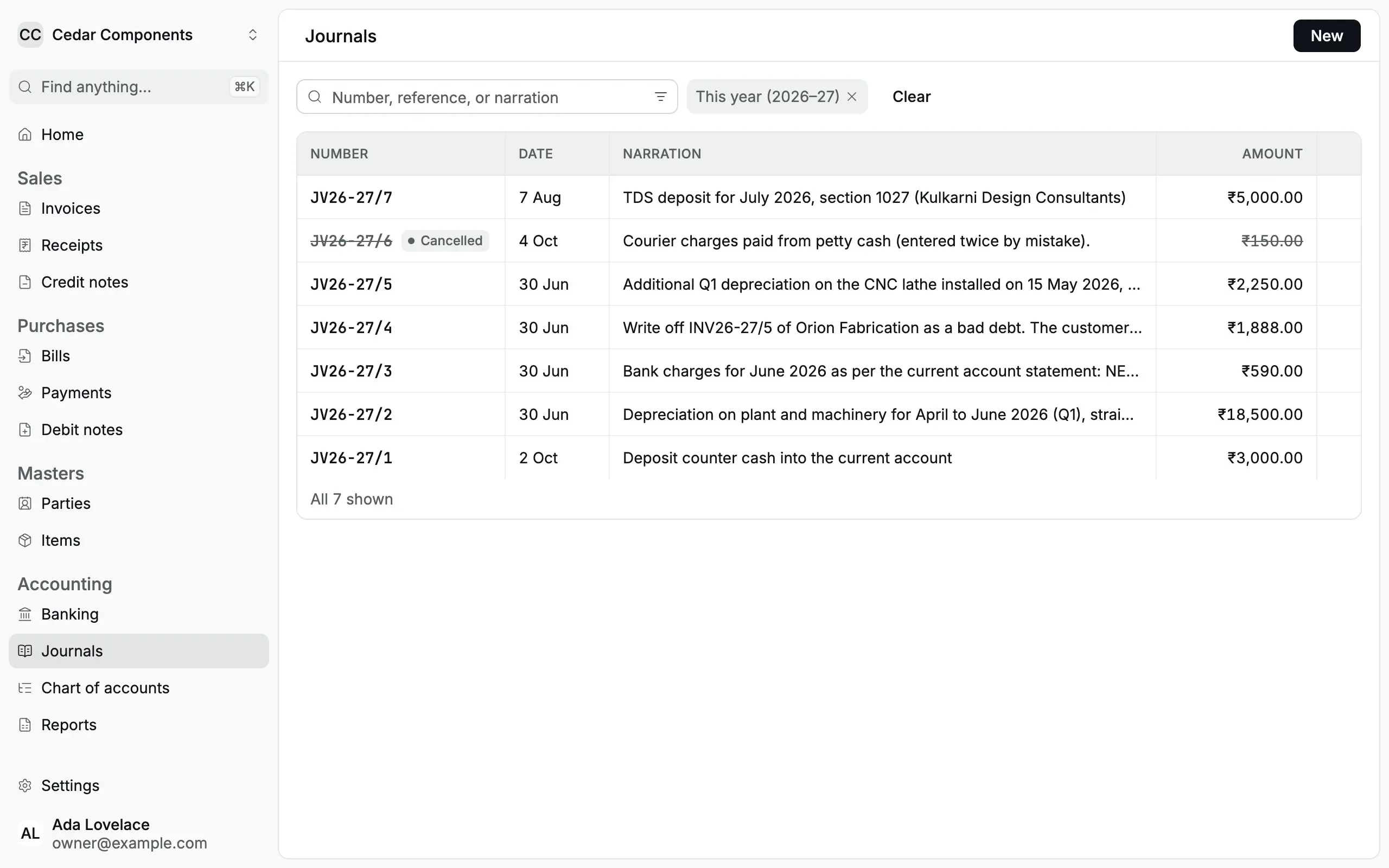
Journals are numbered in their own series, for example JV26-27/4: the journal
prefix from Settings → Organization, the financial year, and the next number.
Post a journal
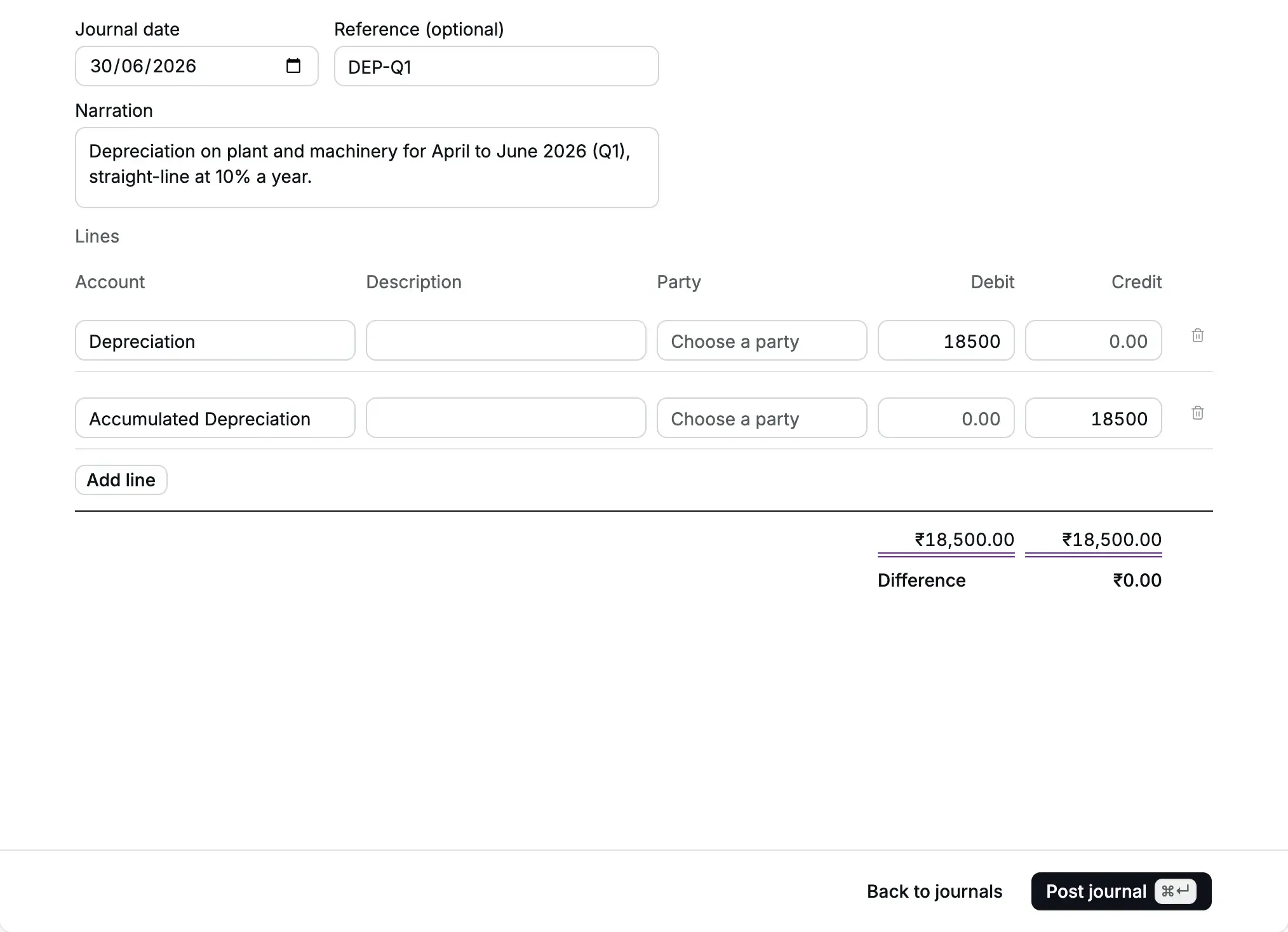
On 30 Jun 2026 the accountant of Cedar Components books depreciation for April to June: ₹18,500 on plant and machinery.
Open a new journal
In Journals, click New. On the same page you can also press ⌘K (Ctrl+K on Windows) and choose New journal.
Fill the header
- Journal date: the date the entry belongs to, here
30/06/2026. It starts on today’s date. - Reference (optional): your own voucher or working-paper number, up to 120
characters, for example
DEP-Q1. - Narration: why you post the entry, up to 500 characters. It is required, and it is what your CA reads in the day book, the date-wise list of every entry.
Enter the lines
Each line has an Account, an optional Description, an optional Party (the customer or vendor, see party), and an amount in Debit or Credit (one of the two, never both). Start typing in Account to search; each option shows the account’s code. Click Add line for more lines; a journal takes 2 to 100 lines.
Here: line 1 Depreciation, Debit 18500; line 2 Accumulated Depreciation,
Credit 18500.
Check the totals
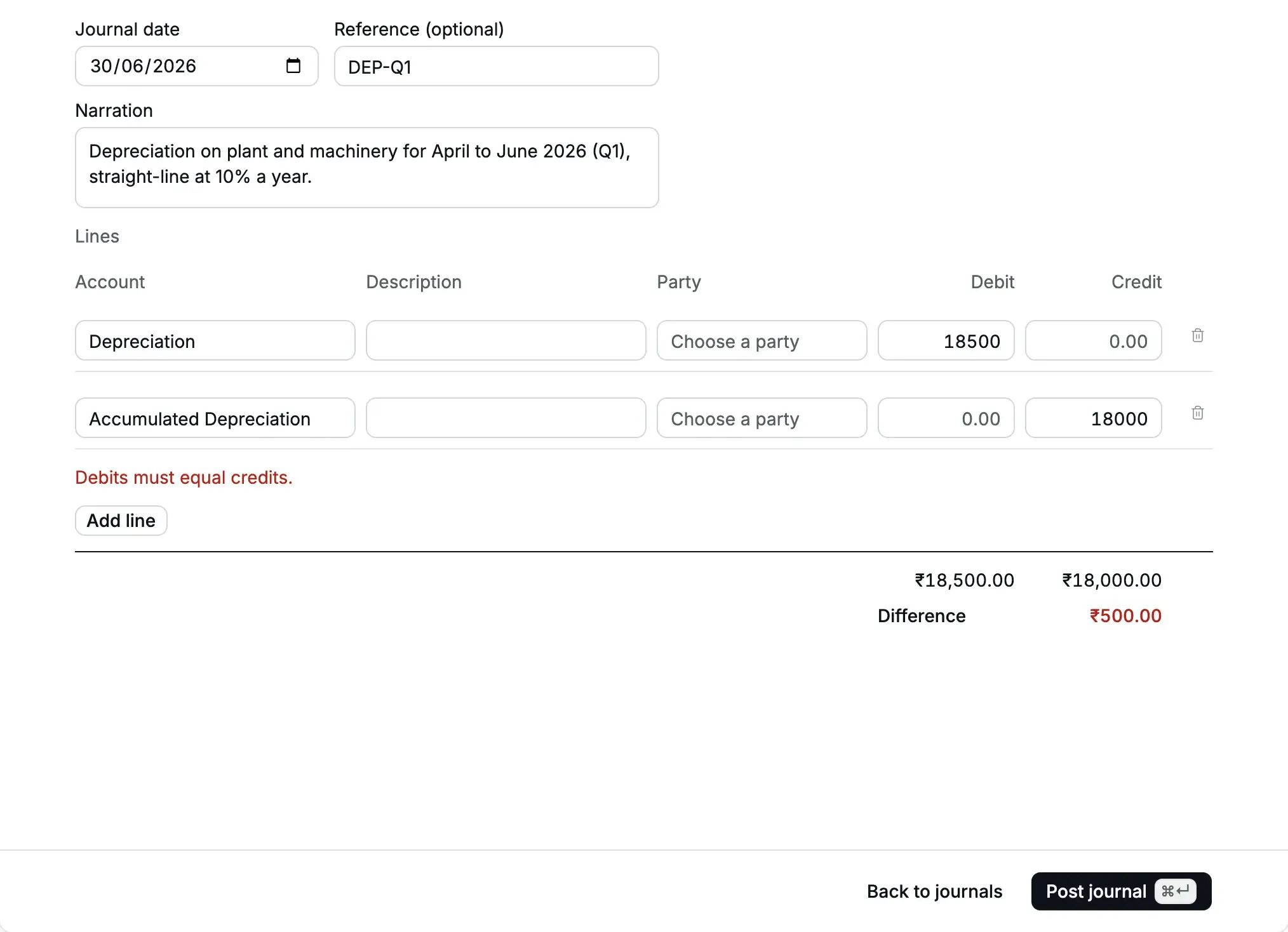
Under the lines, the debit total, the credit total and the Difference update as you type. The difference must be ₹0.00.
Post
Click Post journal or press ⌘↵ (Ctrl+Enter). The message “Journal JV26-27/2 posted” appears, and the journal register opens.
What happens in the books:
| Account | Dr | Cr |
|---|---|---|
| Depreciation (expense) | ₹18,500.00 | |
| Accumulated Depreciation (asset, reduces the asset) | ₹18,500.00 |
The entry appears in the day book, the account ledger of each account (the ledger is the running record of one account), and the trial balance on its journal date. The trial balance lists every account’s balance; its debits and credits must agree.
The rules a journal follows
- Debits equal credits. The debit total must equal the credit total, and each side must be more than zero.
- One side per line. A line has a debit or a credit, not both.
- A narration is required. The reference is optional.
- Posted journals are never edited. To change one, cancel it and post a new one. See Cancel a journal.
- Locked periods are closed. A journal dated on or before the books lock (the date through which a period is closed) is refused unless you have an exception, a time-limited permission to post into the closed period. If any line names a GST account, the tax period lock also applies, with no exceptions. See Locks.
Accounts a journal accepts and refuses
The Account list shows only the accounts a journal may use. Group accounts such as Current Assets only total the accounts under them, so they never appear. Some rows below are system accounts, which Edernal Books creates and uses for its own postings.
| Account | In a journal? | What to use instead |
|---|---|---|
| Your own expense, asset, liability and equity accounts | Yes | |
| Cash and bank accounts (a journal with only cash and bank lines is a contra) | Yes | |
| TDS Payable and TDS Receivable (tax deducted at source, TDS), Round Off, Share Capital (opening equity) | Yes | |
| Income accounts that are exempt, nil-rated or outside GST, such as Interest Income | Yes | |
| Accounts Receivable (what customers owe you, a control account), with a party on the line | Yes | See Party lines |
| Taxable income accounts such as Sales, when the organization has a GSTIN (GST registration number) | No | An invoice, which adds the GST |
| CGST, SGST, IGST (central, state and integrated GST) and cess input and output accounts | Yes | GST payment and input-tax set-off; see below |
| Accounts Payable (what you owe vendors, payable), Customer Advances, Supplier Advances (advances, money paid before the invoice or bill) | No | A payment, debit note or receipt |
| An archived (switched-off) account | No | Restore it in Chart of accounts |
Payables cannot be adjusted with party lines in a journal. To record what you owe a supplier or settle it, use a bill, a payment, or a debit note instead. Putting a vendor’s name on an ordinary journal line does not change their payable balance.
Record a GST payment or input-tax set-off
After agreeing the GSTR-3B amounts with your CA, post a journal with a clear narration and the payment or return reference:
- Payment: debit the relevant GST Output Payable account and credit the bank account for the amount paid.
- Input-tax set-off: debit the relevant GST Output Payable account and credit the GST Input Credit account for the credit used.
Use the CGST, SGST, IGST or cess accounts and amounts your CA confirms; the journal does not choose which credits may be used. It changes the ledger balances but does not add sales or purchases to the GST registers. Choose a date in the open tax period: the tax lock covers every journal with a GST-account line, and a books-lock exception does not override it.
The Party box on an ordinary line is for reference only: the hint reads “Shown in the day book only.” It does not change any party’s balance.
Bank charges
The June bank statement of Cedar Components shows ₹590 of charges for NEFT (bank transfers), SMS alerts and a cheque book. Post a journal dated 30 Jun 2026:
| Account | Dr | Cr |
|---|---|---|
| Bank Charges | ₹590.00 | |
| Bank Account | ₹590.00 |
Move money between cash and bank
A journal whose lines are all cash or bank accounts is a contra entry. To deposit ₹3,000 of counter cash into the current account: Dr Bank Account ₹3,000, Cr Cash in Hand ₹3,000. Cedar Components posted this as JV26-27/1 on 2 Oct 2026.
Party lines on Accounts Receivable
A line on Accounts Receivable changes what a customer owes, so it needs a party. When you choose that account, the party box turns to Party (required) with the hint “Changes what this party owes”.
- A credit on Accounts Receivable lowers the customer’s balance. The form shows the customer’s Open invoices, so you can settle them in the same journal. Type an amount against an invoice, or click Fill to allocate as much as fits. To allocate is to match the credit to a specific invoice. Below the grid, Party allocated and Remaining to allocate keep count.
- Any credit you do not allocate stays as the customer’s open credit (credit, an amount in the customer’s favour not yet matched). Settle it later from Apply credit. It is not an advance and has no GST.
- A debit on Accounts Receivable raises the customer’s balance. It becomes an open item that a later receipt can settle, listed with the type Journal and no due date.
- One journal can touch several customers. Dr Accounts Receivable for one customer and Cr Accounts Receivable for another moves a balance between them; the Accounts Receivable total does not change.
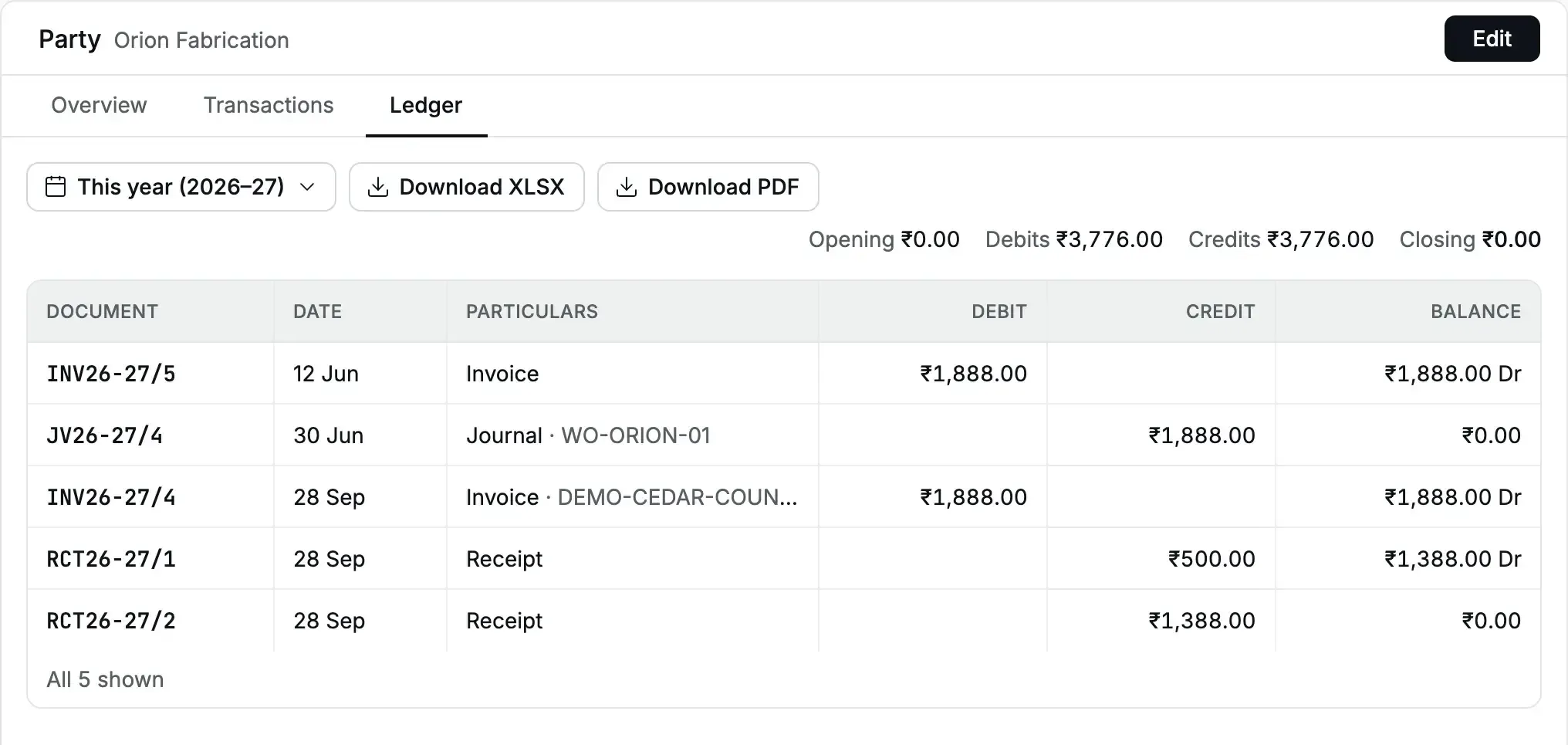
Each party line appears in the customer’s party ledger on the journal date.
Write off a bad debt
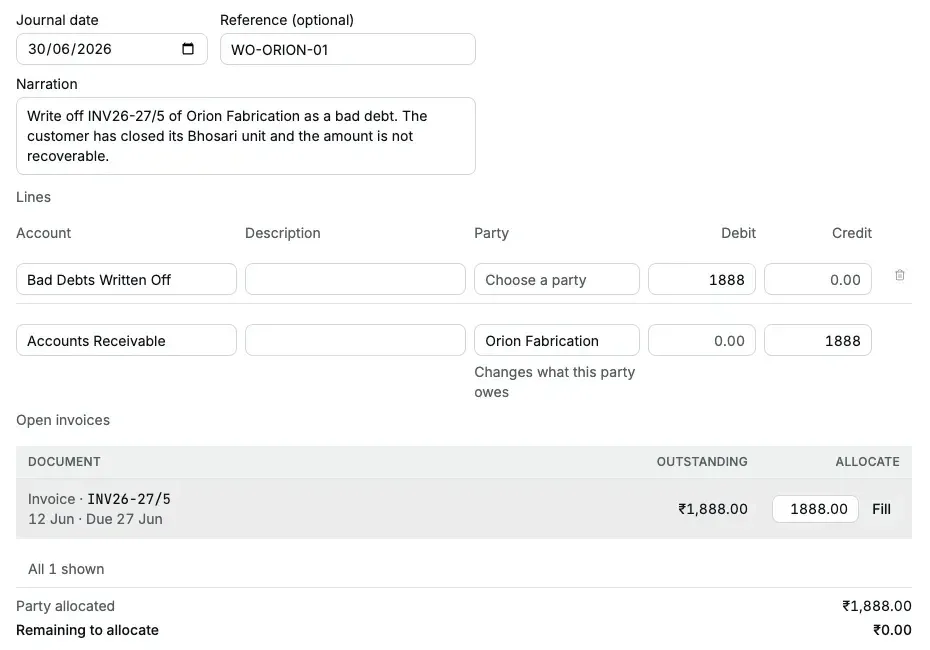
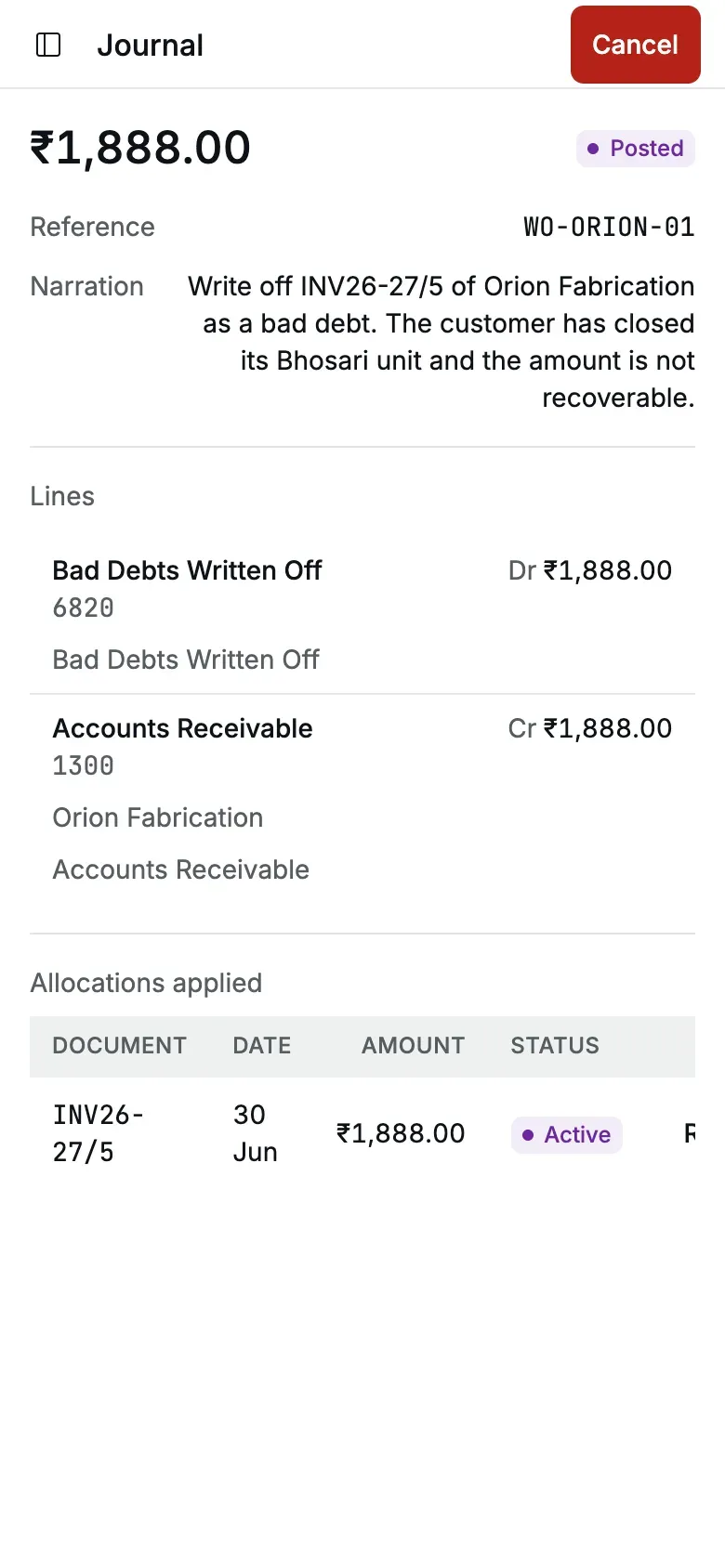
Orion Fabrication has ₹1,888.00 outstanding (still unpaid) on INV26-27/5 of 12 Jun 2026 (two mounting brackets at ₹800 each plus 18% GST). In June the customer closes its Bhosari unit, and Cedar Components decides the amount is not recoverable.
Start a journal on the write-off date
Journal date 30/06/2026, Reference WO-ORION-01, and a narration that names the
invoice and the reason.
Debit the expense
1888.Credit the customer
Line 2: Accounts Receivable, Party Orion Fabrication, Credit 1888. The Open
invoices grid lists INV26-27/5 with ₹1,888.00 outstanding.
Allocate to the invoice
Click Fill on INV26-27/5. Remaining to allocate shows ₹0.00.
Post
| Account | Party | Dr | Cr |
|---|---|---|---|
| Bad Debts Written Off | ₹1,888.00 | ||
| Accounts Receivable | Orion Fabrication | ₹1,888.00 |
Write off the full invoice, GST included. GST law gives no refund of output tax (the GST you charged on the sale) on a bad debt, so the GST you paid stays paid and the whole amount is the loss.
The journal record
Click a journal in the register to open its record. The header shows the number and date, the amount, and Posted or Cancelled, with Print (the journal voucher PDF in its own tab, ready to sign) and Download PDF. Below are the Reference, Narration, the Lines with account, description, party, debit and credit, and for party lines:
- Allocations applied: invoices this journal settled, with Reverse on each active row.
- Allocations received: other documents, such as a receipt, that settled this journal’s debit.
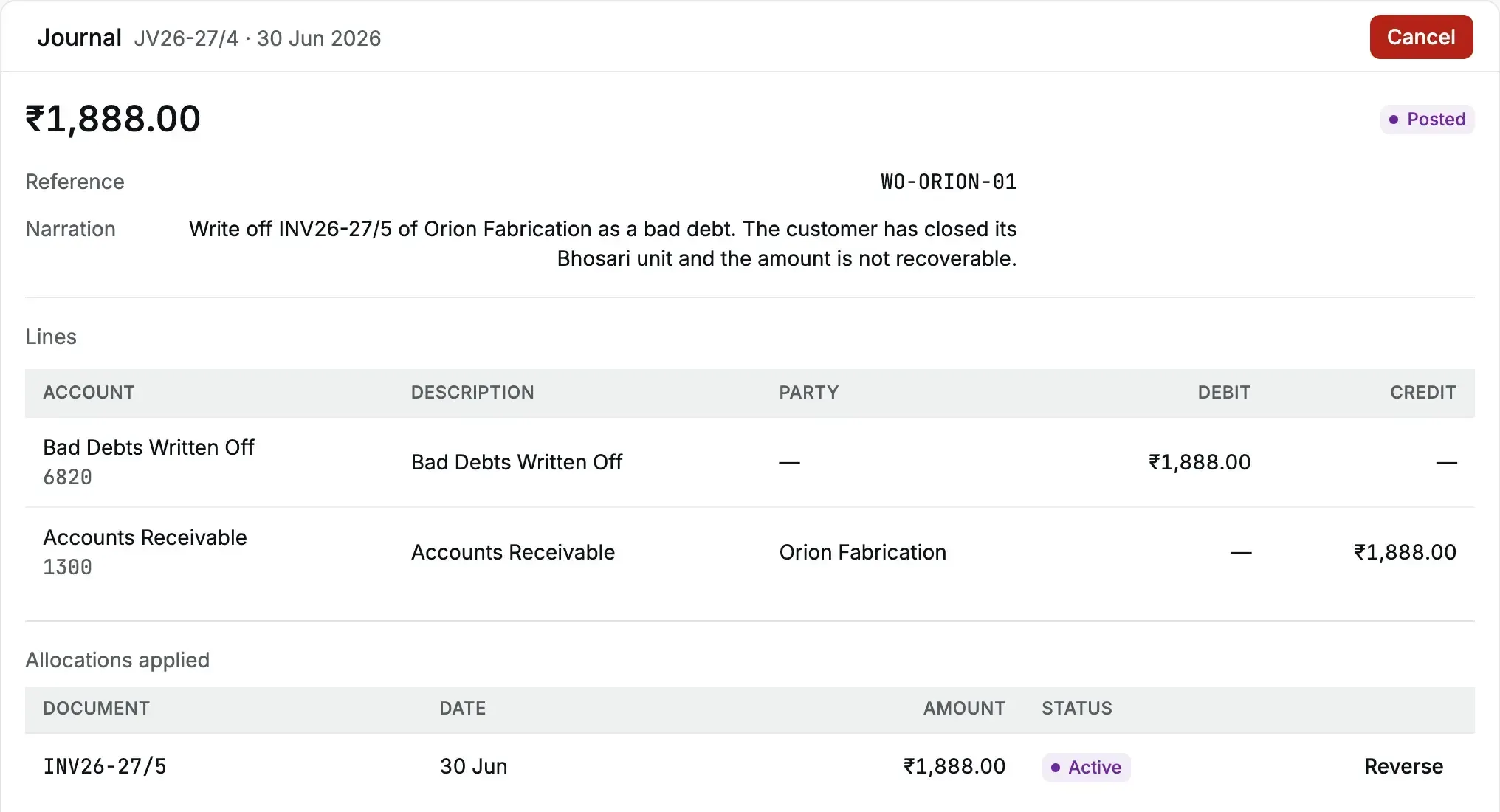
To undo one match without cancelling the journal, click Reverse and give a reason. The dialog says “Both documents become open to settle again.”
Cancel a journal
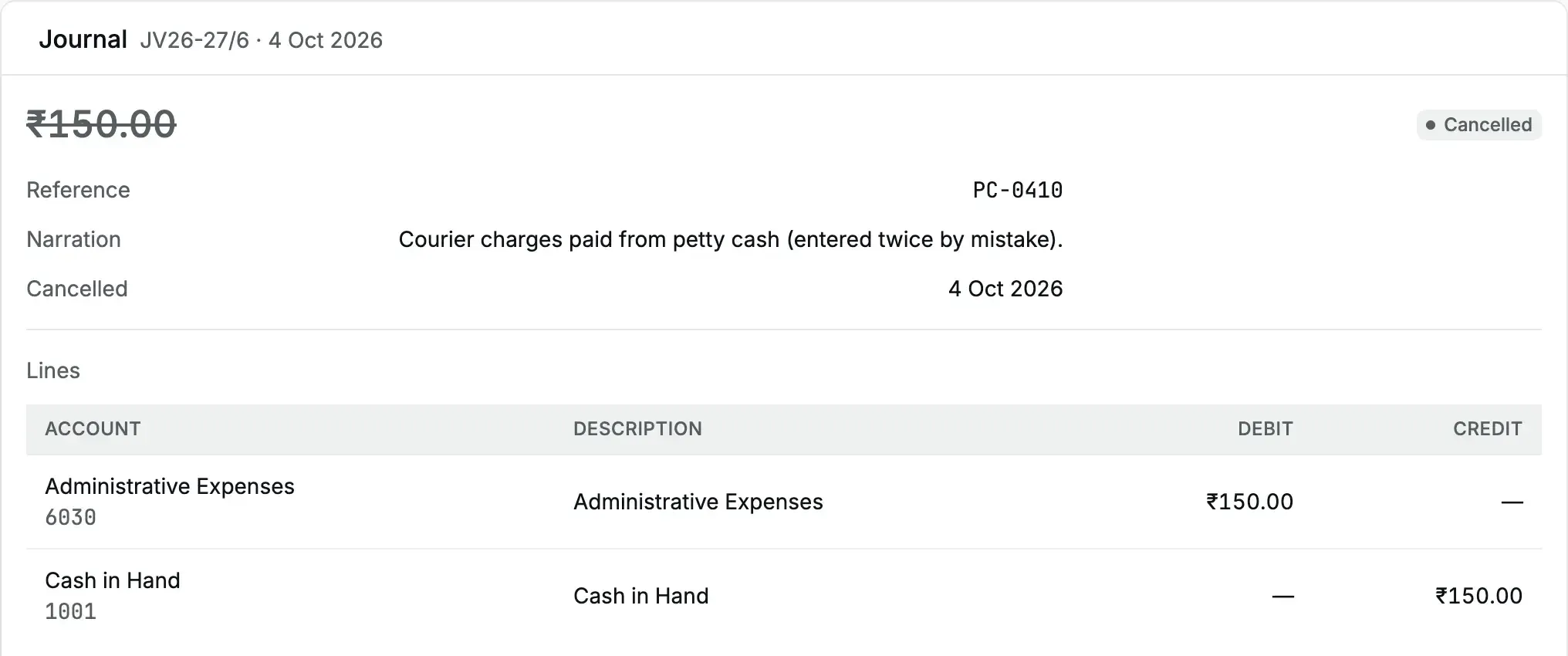
Cancel a journal when it was wrong. The journal stays in the register, struck through, and Edernal Books posts a reversal: an equal and opposite entry that cancels the original.
- Open the journal and click Cancel.
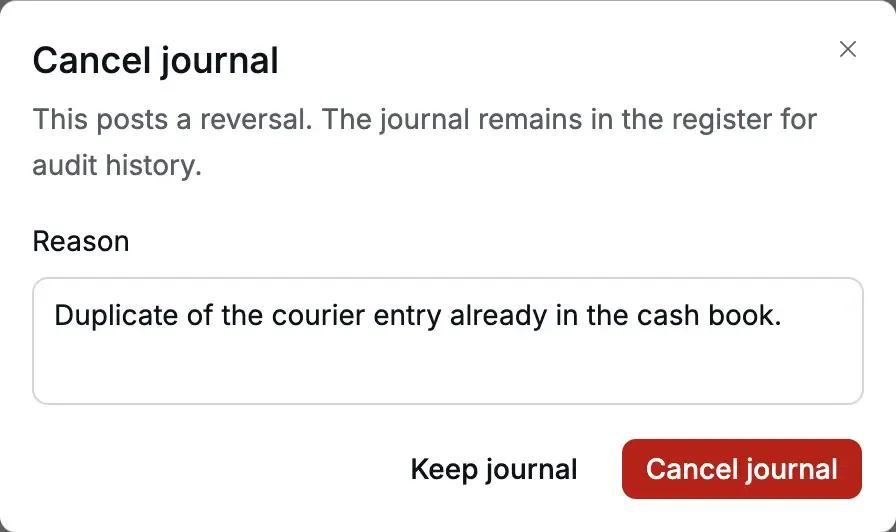
- In Cancel journal (“This posts a reversal. The journal remains in the register for audit history.”), type the reason.
- Click Cancel journal. The message “Journal cancelled” appears and the state turns to Cancelled.
What happens:
- The reversal uses the journal date, correcting balances from that date. A books lock on that date requires an exception before cancellation.
- Invoices the journal settled become open again; their allocations are reversed automatically.
- If a receipt or credit note settled this journal’s debit, Cancel is disabled and the record says “Reverse the active allocations received below before cancelling this journal.” Reverse those first.
- The reason is kept in Settings → Audit (the audit log, the record of sensitive actions) and as the narration of the reversing entry. The journal record shows only the cancellation date.
Common errors
| Message | Why | What to do |
|---|---|---|
| Debits must equal credits. | The totals differ, or one side is zero | Check the Difference line and fix an amount |
| Enter a debit or a credit | A line has both sides or neither | Clear one side, or remove the empty line |
| Add at least two lines | Only one line remains | Add the other side of the entry |
| Choose an account | A line has no account | Pick an account or remove the line |
| Enter a narration | The narration is empty | Say why you post the entry |
| Choose a party | An Accounts Receivable line has no party | Choose the customer |
| Enter no more than ₹… | An allocation is more than the invoice’s outstanding or the line’s credit | Lower the amount |
| Taxable income is invoiced, not journaled. | A taxable income account is on a line | Raise an invoice instead |
| Choose active leaf accounts; unsupported party control and advance accounts are posted by documents. | A payables, advance, group or archived account | Use the document from the table above |
| Books are locked through 30 Jun 2026. Ask for an exception to post on or before that date. | The journal date is in a locked period | Date it after the lock, or ask the owner or CA for an exception |
On a phone
The register, the form and the record work on a phone. On a narrow screen the record header shows only “Journal”, so check the number in the register before you open it.
Related pages
- Locks: close a period and post late corrections.
- Apply credit: use a journal’s open credit against an invoice.
- Day book and Trial balance: check what you posted.
- Closing a quarter: journals and locks in one story.