Day book
See every entry posted in a period with all its debit and credit lines
The day book lists every journal entry (one balanced set of debit and credit lines) in a period, in date order, with all its lines. Use it at day close to check what was posted today, or to review one kind of document, such as all receipts of the week.
Question it answers: what was posted in this period, and to which accounts?
Who can open it: Owner, Accountant and Chartered Accountant.
For a day-close breakdown by Payment method (name, receipt count and amount), open Sales → Receipts and choose Today or a custom range covering one day. Filter State to Posted to exclude cancelled receipts. The day book’s debit and credit totals are accounting entries, not a breakdown of receipt methods.
Open the day book
Open the report
Choose the period
Choose This month or another preset, or pick dates in Custom range and click Apply.
Filter by document type (optional)
In All document types, choose Receipts, Payments, Invoices, Bills, Credit notes, Debit notes, Journals, Opening balances or Allocations. A journal is a manual entry; an allocation applies an advance or credit to an invoice or bill.
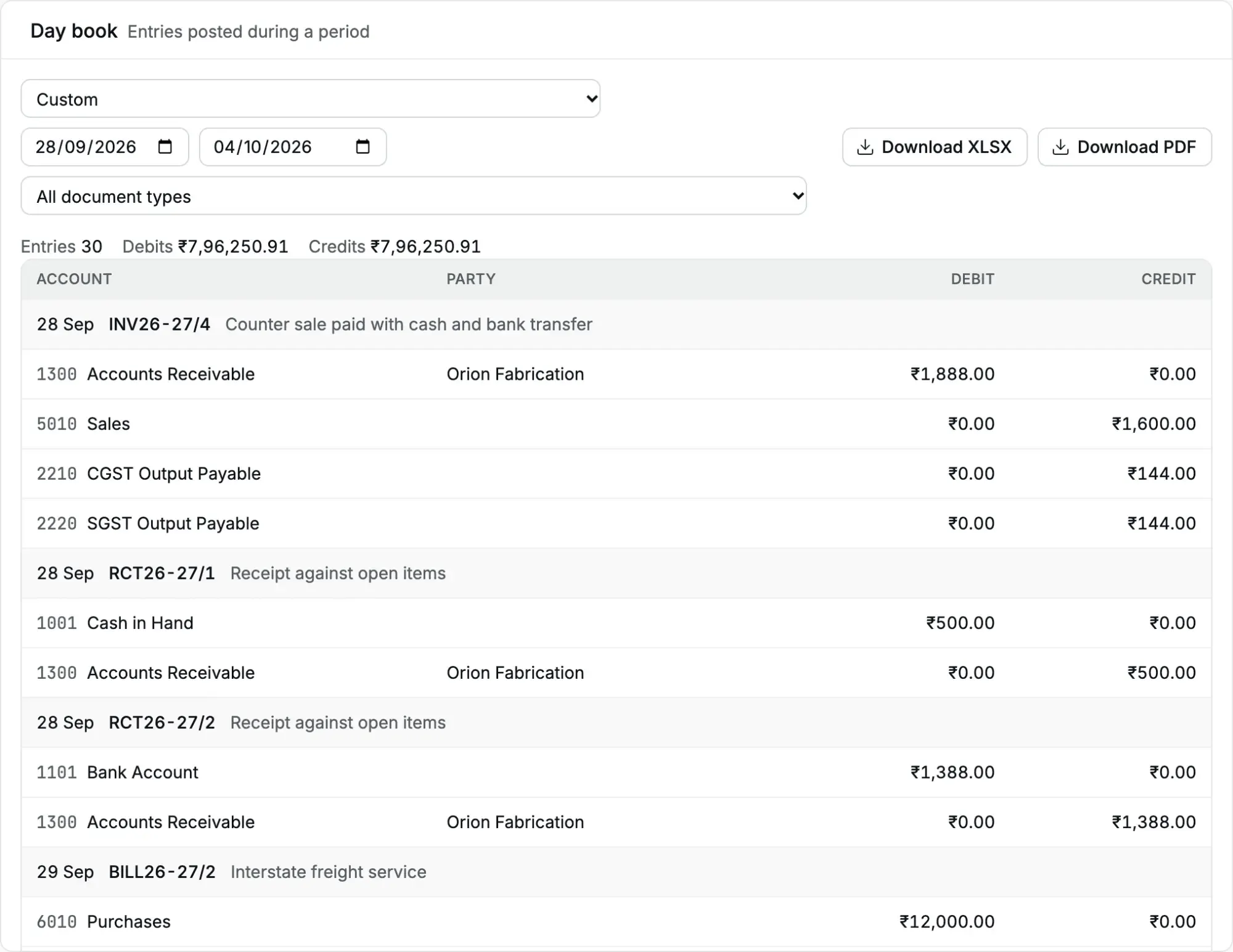
Read the day book
The line above the table sums up the period:
| Figure | Meaning |
|---|---|
| Entries | The number of journal entries |
| Debits | The total of all debit lines |
| Credits | The total of all credit lines; always equal to Debits |
Each entry starts with a shaded heading row: the date, the document number (a link to the document) and the narration. A reversal names the original document and cancellation reason; an allocation names its source and target documents, and links to the source. The rows below it are the entry’s lines:
| Column | Meaning |
|---|---|
| Account | Account code and name |
| Party | The party on the line, if any |
| Debit, Credit | The amount of the line (debit and credit) |
For example, receipt RCT26-27/2 from Orion Fabrication on 28 Sep 2026 shows two lines:
| Account | Party | Debit | Credit |
|---|---|---|---|
| 1101 Bank Account | ₹1,388.00 | ₹0.00 | |
| 1300 Accounts Receivable | Orion Fabrication | ₹0.00 | ₹1,388.00 |
The Total row at the bottom repeats the debit and credit totals. It shows once the last entry has loaded.
Which date an entry uses
The day book uses the document date, not the time you posted it. A bill you post today with yesterday’s date appears in yesterday’s day book.
A cancellation is its own entry, a reversal, dated on the original document date, with a narration such as “Cancelled RCT26-27/5: Duplicate receipt”. Its lines mirror the original. Cancelling a receipt from last week places both entries in last week’s day book.
An Allocation entry reads “RCT26-27/2 applied to INV26-27/3” (source number, then target number). It records an advance or credit note applied to an invoice or bill, links to its source document, and moves the amount between two accounts of the same party. When someone undoes it, the entry reads “Undone: RCT26-27/2 applied to INV26-27/3: the reason”.
Day close
At the end of the day:
- Open the day book for Today.
- Choose Receipts in the document type list. Check each receipt against the counterfoils or the receipt book.
- Open the account ledger (the ledger of one account) for Cash in Hand for Today and compare Closing with the cash in the drawer.
- Repeat for Payments if you paid out money.
The day book has no total per payment method (cash, UPI, card and so on). To total today’s UPI or card collections, filter the Receipts register by payment method, or open the ledger of the bank account that the method lands in.
Download
- Download Excel saves one row per line, with Date, Document, Type, Kind, Account code, Account, Party, Debit, Credit and Narration. Type uses readable names (for example “Debit note”) and Kind reads “Posted” or “Cancellation”. The document type filter applies. It holds up to 1,00,000 lines.
- Print opens the day book in its own tab, and Download PDF saves it. The PDF holds up to 5,000 lines.
On a busy day the PDF can exceed its limit. The tab then shows only the text “This report exceeds 5,000 lines; narrow the filters or choose a shorter period.” Choose a shorter period or a document type, or use Download Excel.
Common questions
The day book says “No entries posted in this period.” Nothing is dated in the period. Check the selected dates; the day book opens on Today.
I cannot see why a receipt was cancelled. Check its reversal narration for the reason. The audit log also records the cancellation.