Collect school fees
A school collects term fees in cash, UPI and bank transfer, takes an advance, cancels a duplicate and closes the day
Ridgeview Academy is a school run by Ridgeview Education Trust. On 4 Oct 2026 the fee counter collects Term 2 fees from three parents, takes Term 3 fees in advance (money paid before the service) from a fourth, and cancels one receipt the cashier entered twice. At the end of the day the accountant checks the day book (every entry of the day) and the cash, and the principal looks at the fee income.
The school does not raise an invoice for each term. It records each payment as a Direct receipt to the Fees income account: the settlement kind that books money straight to income. Most school education services are exempt from GST; check with your CA which of your fees are exempt.
Who does it: the cashier posts receipts (Owner, Accountant or Operator; see roles). Only an Owner or Accountant can cancel a receipt. The day-close reports need an Owner, Accountant or Chartered Accountant.
The day at a glance
| Receipt | Parent | Child | Method | Kind | Amount |
|---|---|---|---|---|---|
| RCT26-27/51114 | Imran Sharma | Aisha, Class 6-B | Cash | Direct to Fees | ₹18,500.00 |
| RCT26-27/51115 | Pooja Nair | Kabir, Class 3-A | HDFC UPI | Direct to Fees | ₹18,500.00 |
| RCT26-27/51116 | Farhan Jain | Zara, Class 8-C | ICICI NEFT | Direct to Fees | ₹22,000.00 |
| RCT26-27/51117 | Deepa Reddy | Rohan, Class 5-A | HDFC NEFT | Advance for Term 3 | ₹18,500.00 |
| RCT26-27/51118 | Imran Sharma | Aisha, Class 6-B | Cash | Duplicate, cancelled | ₹18,500.00 |
1. Collect a fee in cash
Imran Sharma pays ₹18,500.00 in cash for his daughter Aisha’s Term 2 tuition.
Open a new receipt
Enter the payer and amount
In Party, type “Imran Sharma” and choose him; a party is anyone you deal with. In Amount, type 18500. Payment method (payment method: how the money came in) is already Cash.
Choose Direct and the income account
Click Direct. In Income account, choose Fees.
Add the details
In Reference, type the fee-card number, T2-6B-014. In Narration (the narration, a note on the document), type “Term 2 tuition fee, Aisha Sharma, Class 6-B”. Leave Date as today.
Post
Click Post. The message “Receipt RCT26-27/51114 posted” appears, and the form clears for the next parent.
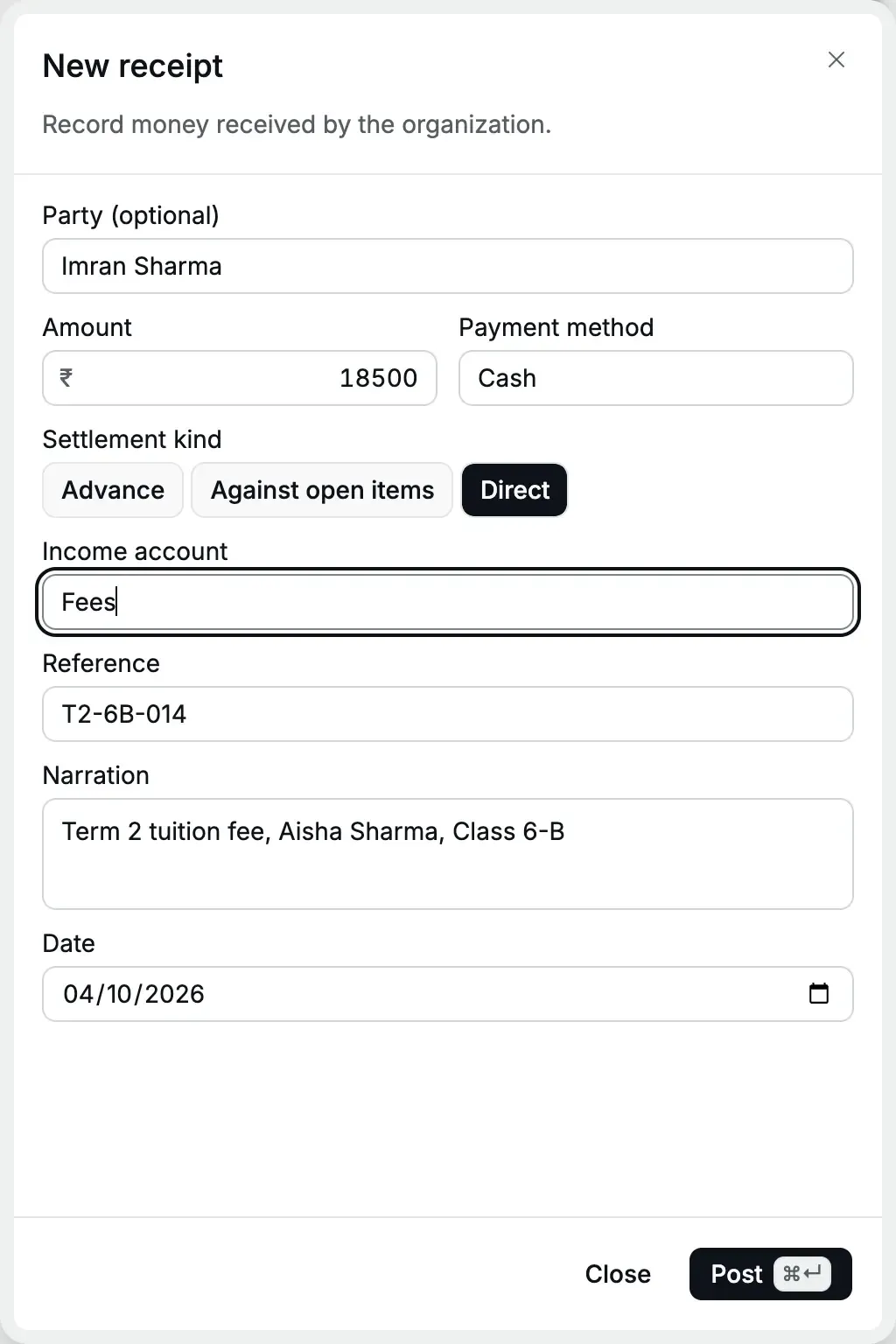
What happens in the books (debit and credit, the two equal sides of every entry):
| Account | Debit | Credit |
|---|---|---|
| 1001 Cash in Hand | ₹18,500.00 | |
| 5010 Fees (party Imran Sharma) | ₹18,500.00 |
See Receipts for every field of the form.
2. Collect fees by UPI and bank transfer
Pooja Nair pays ₹18,500.00 by UPI (instant phone transfer). Farhan Jain pays ₹22,000.00, tuition and transport, by NEFT (a bank-to-bank transfer) into the ICICI account. Post each one the same way, with two changes:
- In Payment method, choose HDFC UPI or ICICI NEFT. The method decides the bank account: HDFC UPI lands in HDFC Bank - Current, ICICI NEFT in ICICI Bank - Savings.
- In Reference, type the UPI or UTR (the bank’s transfer reference) number from the bank alert, so you can match it on the bank statement.
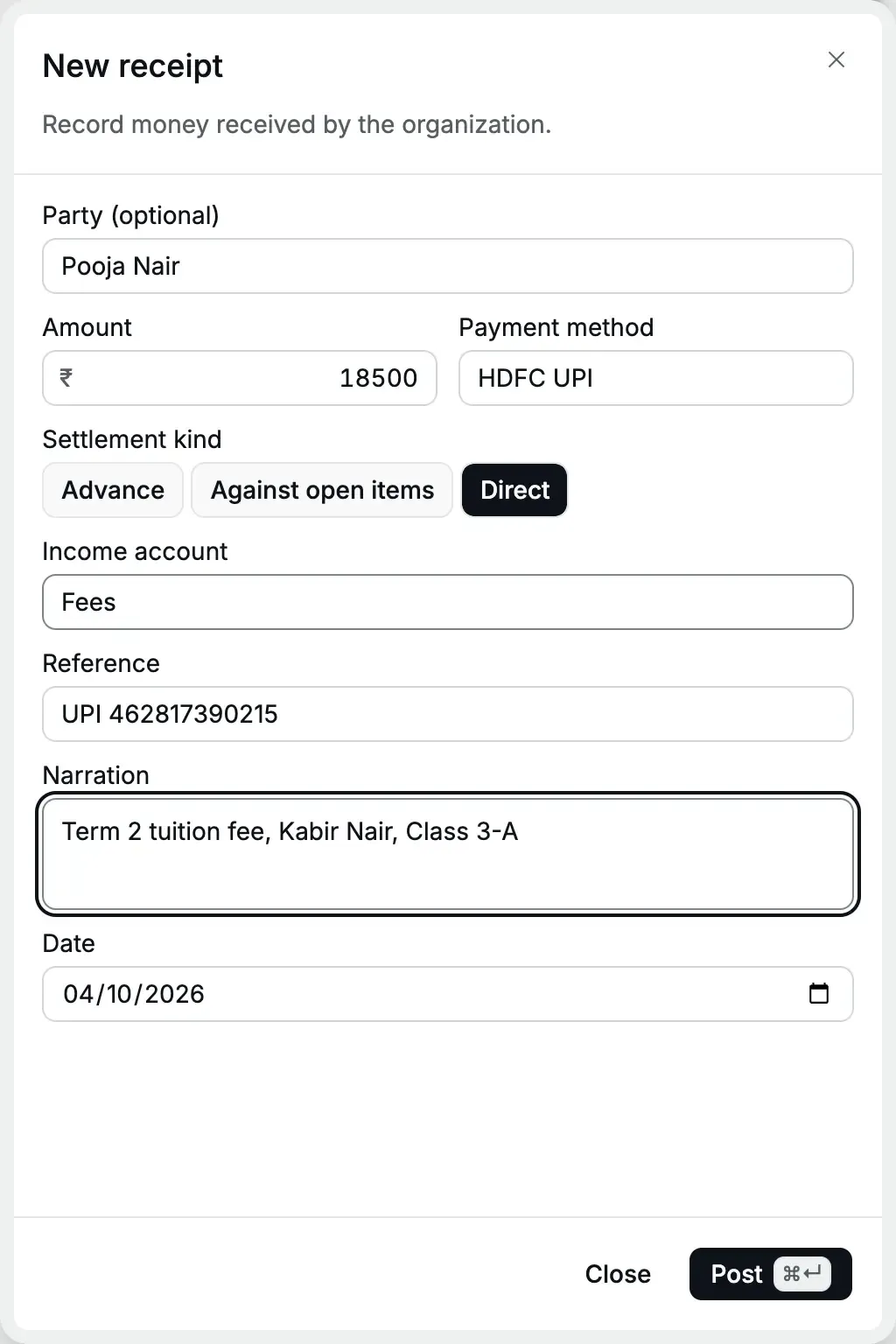
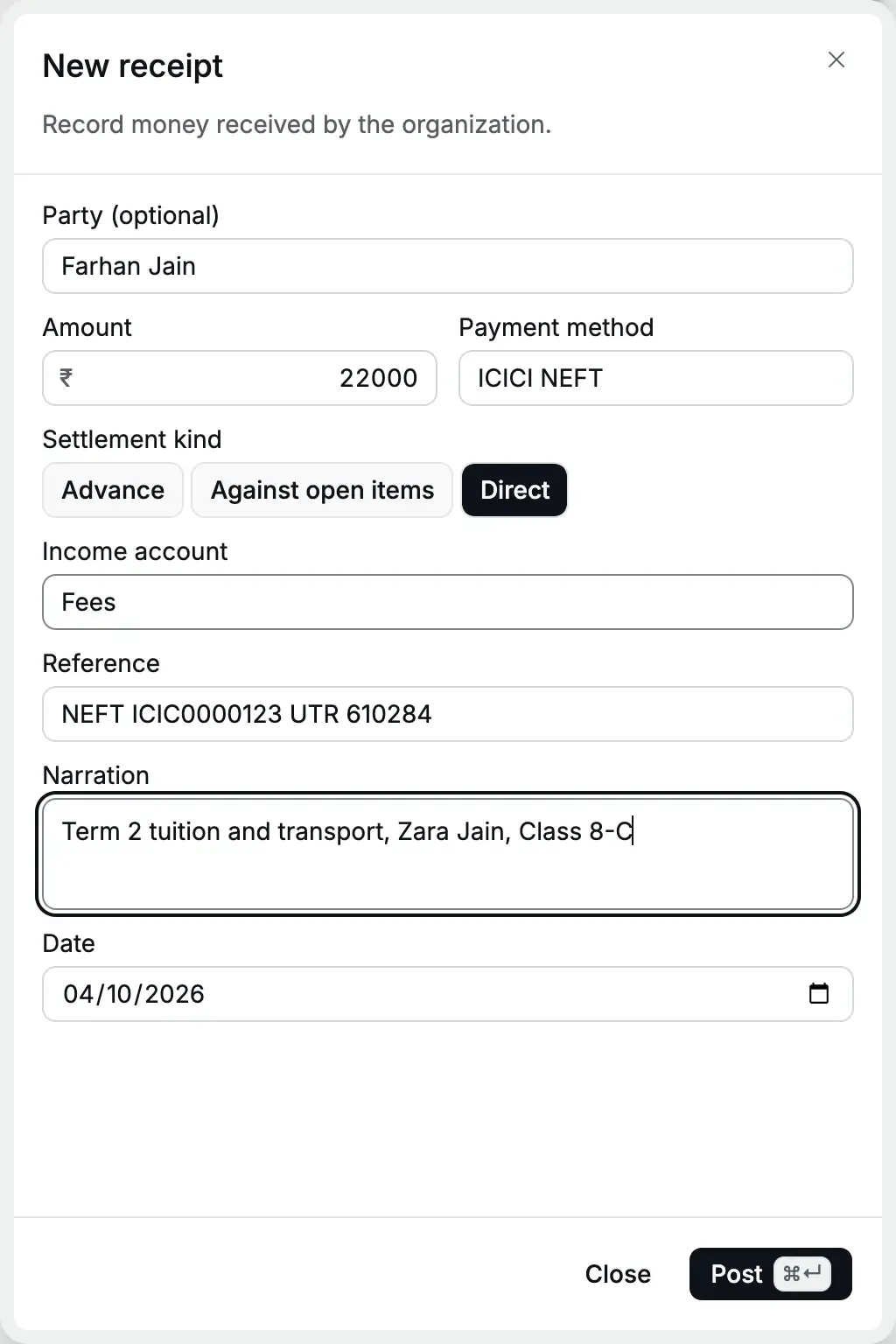
| Receipt | Debit | Credit |
|---|---|---|
| RCT26-27/51115 | 1101 HDFC Bank - Current ₹18,500.00 | 5010 Fees ₹18,500.00 |
| RCT26-27/51116 | 1102 ICICI Bank - Savings ₹22,000.00 | 5010 Fees ₹22,000.00 |
3. Take an advance for next term
Deepa Reddy pays Term 3 fees of ₹18,500.00 now, by NEFT. Term 3 starts in January, so this is not this term’s income yet. Record it as an advance.
Enter the payer, amount and method
In a new receipt, choose Deepa Reddy, type 18500 and choose HDFC NEFT.
Keep Advance
Advance is selected by default. In Advance for, choose Exempt supply, because school education is exempt from GST.
Add the details and post
Type the UTR in Reference and “Term 3 tuition fee paid in advance, Rohan Reddy, Class 5-A” in Narration. Click Post.
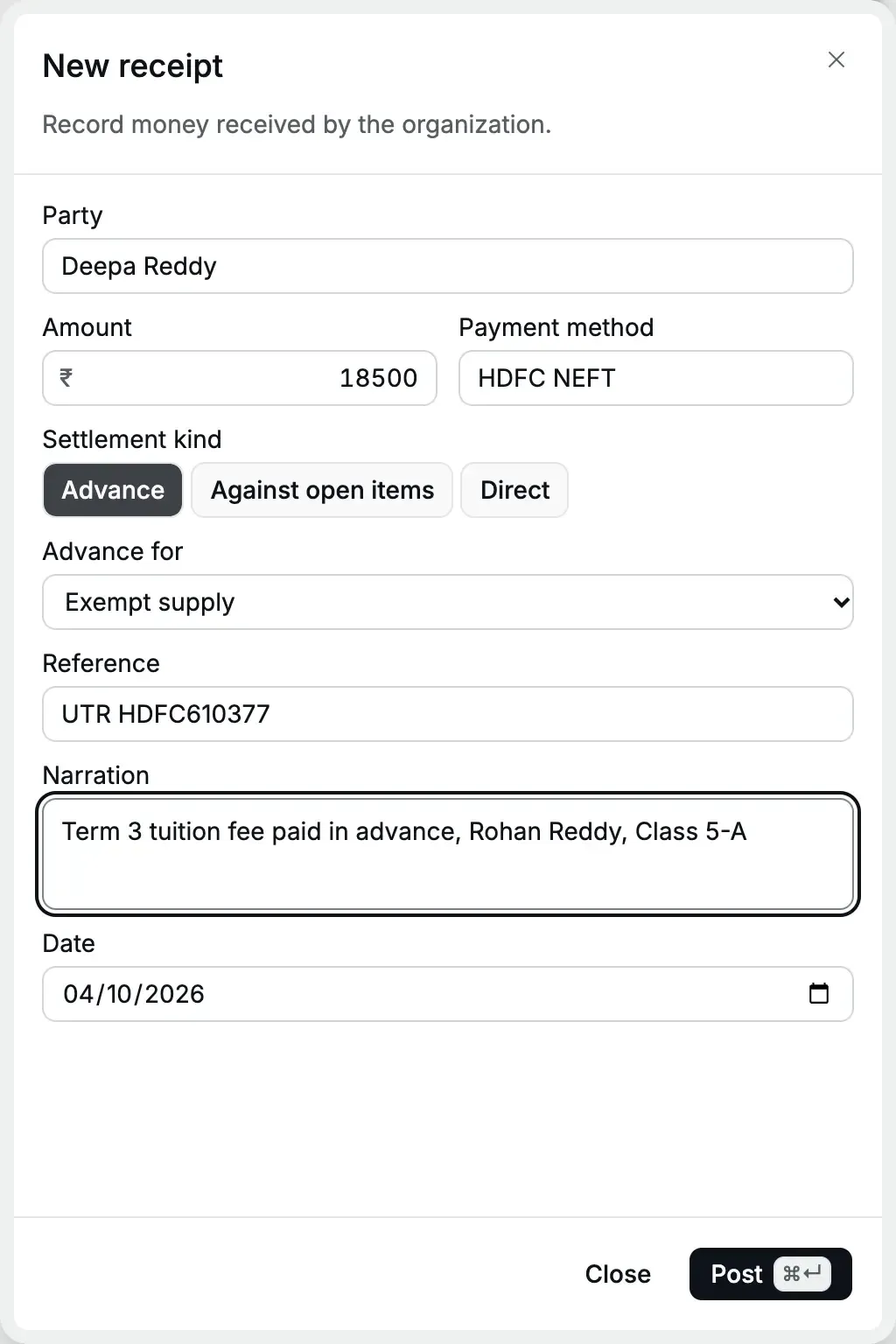
| Account | Debit | Credit |
|---|---|---|
| 1101 HDFC Bank - Current | ₹18,500.00 | |
| 2150 Customer Advances (party Deepa Reddy) | ₹18,500.00 |
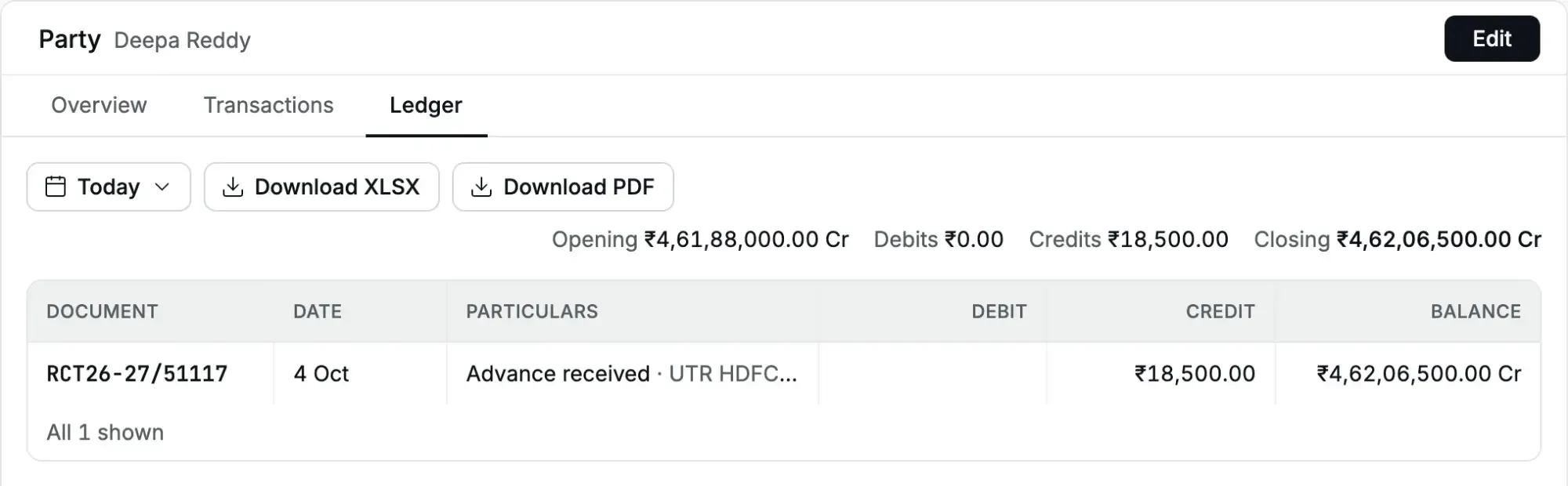
The advance is a liability, something the school owes: the school owes Deepa Reddy a term of teaching. It does not appear in the profit and loss (P&L). Her party ledger shows it as “Advance received” and a Cr balance.
4. Cancel a duplicate receipt
The cashier posts Imran Sharma’s cash fee a second time, as RCT26-27/51118. Edernal Books does not warn about the same reference. The accountant cancels the duplicate.
Open the receipt
In Receipts, click RCT26-27/51118. The receipt opens in a panel.
Cancel it
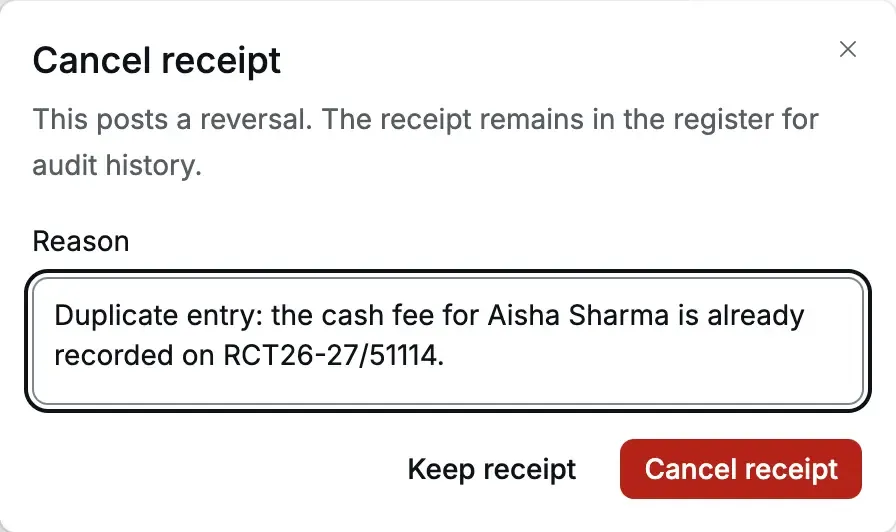
Click Cancel receipt. Type the reason: “Duplicate entry: the cash fee for Aisha Sharma is already recorded on RCT26-27/51114.” The Cancel receipt button becomes active only after you type a reason. Click it.
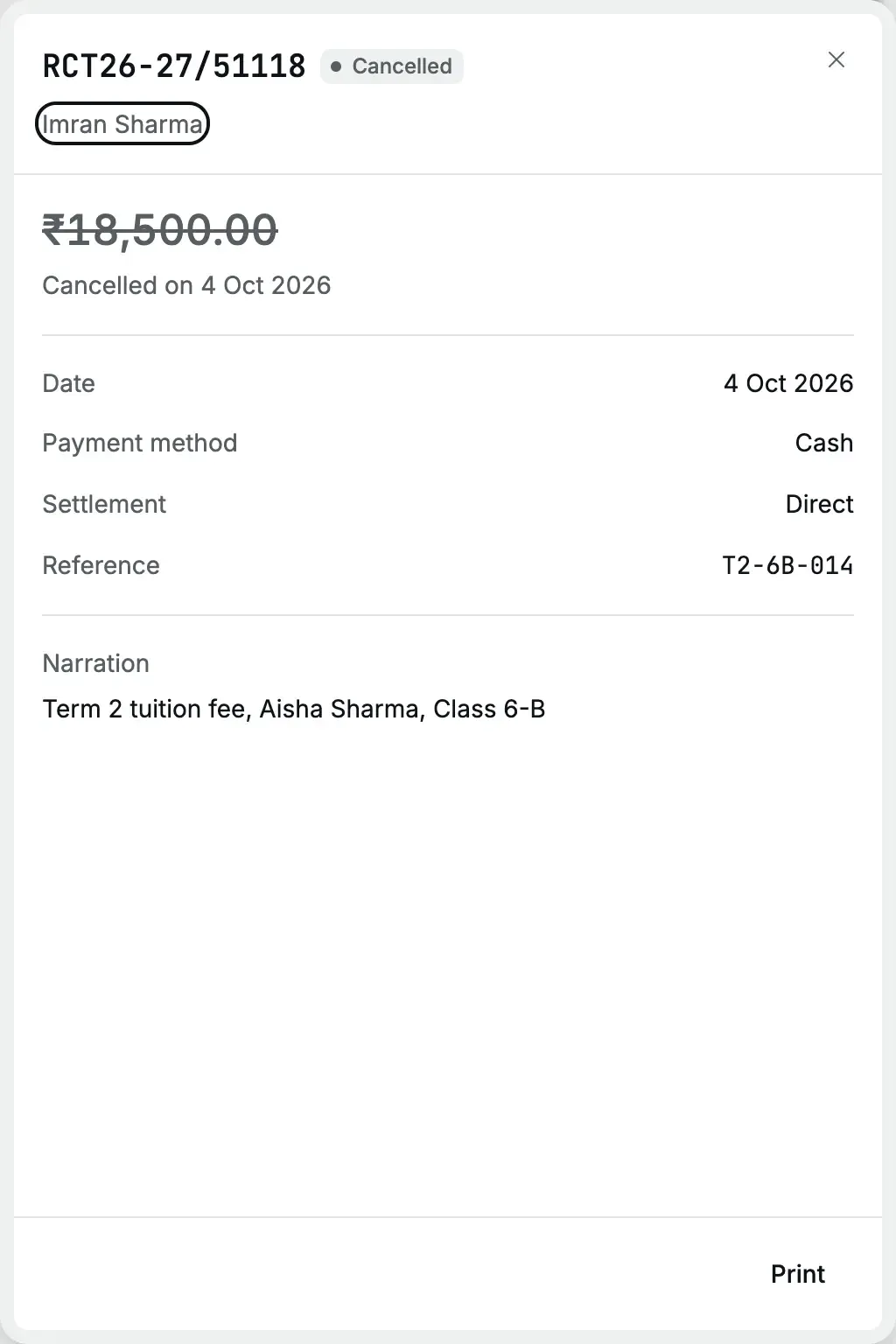
Edernal Books keeps the receipt and posts a reversal, an equal and opposite entry, on the receipt’s original date (today in this example):
| Entry | Account | Debit | Credit |
|---|---|---|---|
| RCT26-27/51118 | 1001 Cash in Hand | ₹18,500.00 | |
| 5010 Fees | ₹18,500.00 | ||
| Cancelled RCT26-27/51118 | 5010 Fees | ₹18,500.00 | |
| 1001 Cash in Hand | ₹18,500.00 |
The receipt panel shows “Cancelled on 4 Oct 2026” but not the reason. The reason is in the audit log, the record of sensitive actions (audit log).
5. Close the day
At 5 pm the accountant checks the day’s postings.
Look at today's receipts
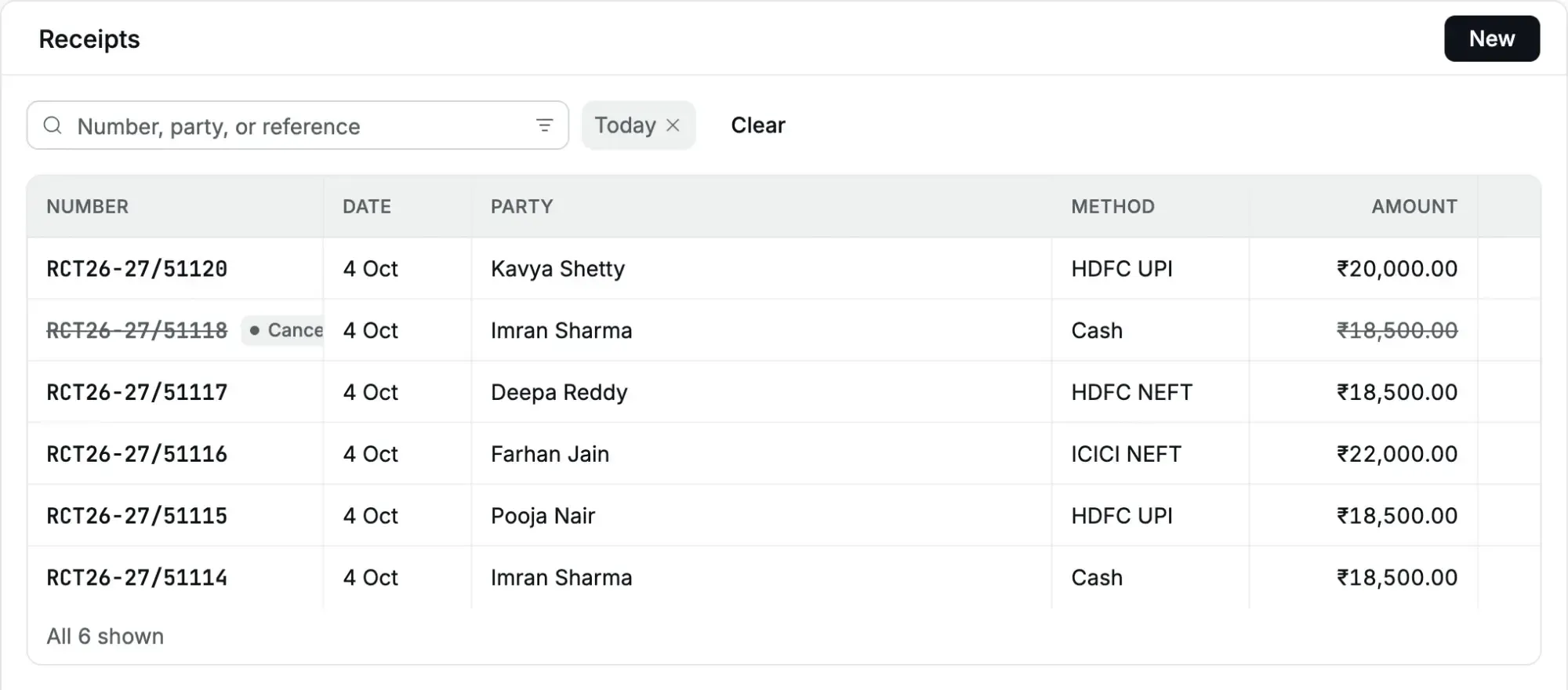
Open Receipts and set the date filter to Today. The register shows the five receipts from this page, one marked Cancelled, and RCT26-27/51120, a ₹20,000.00 UPI receipt from Kavya Shetty that a second cashier posted the same day.
Open the day book
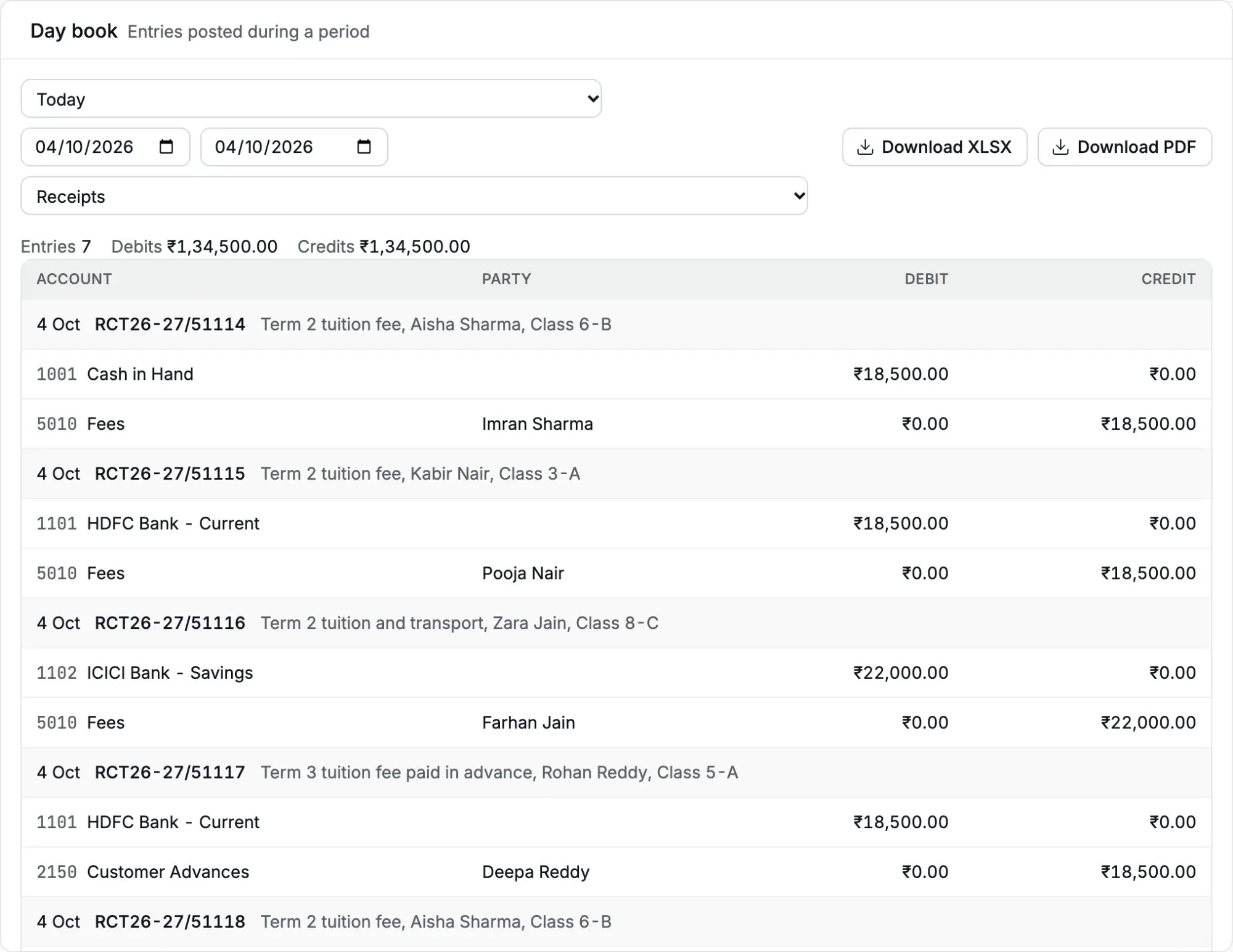
Click Reports, then Day book. It opens for Today. Choose Receipts in the document type list.
Count the cash
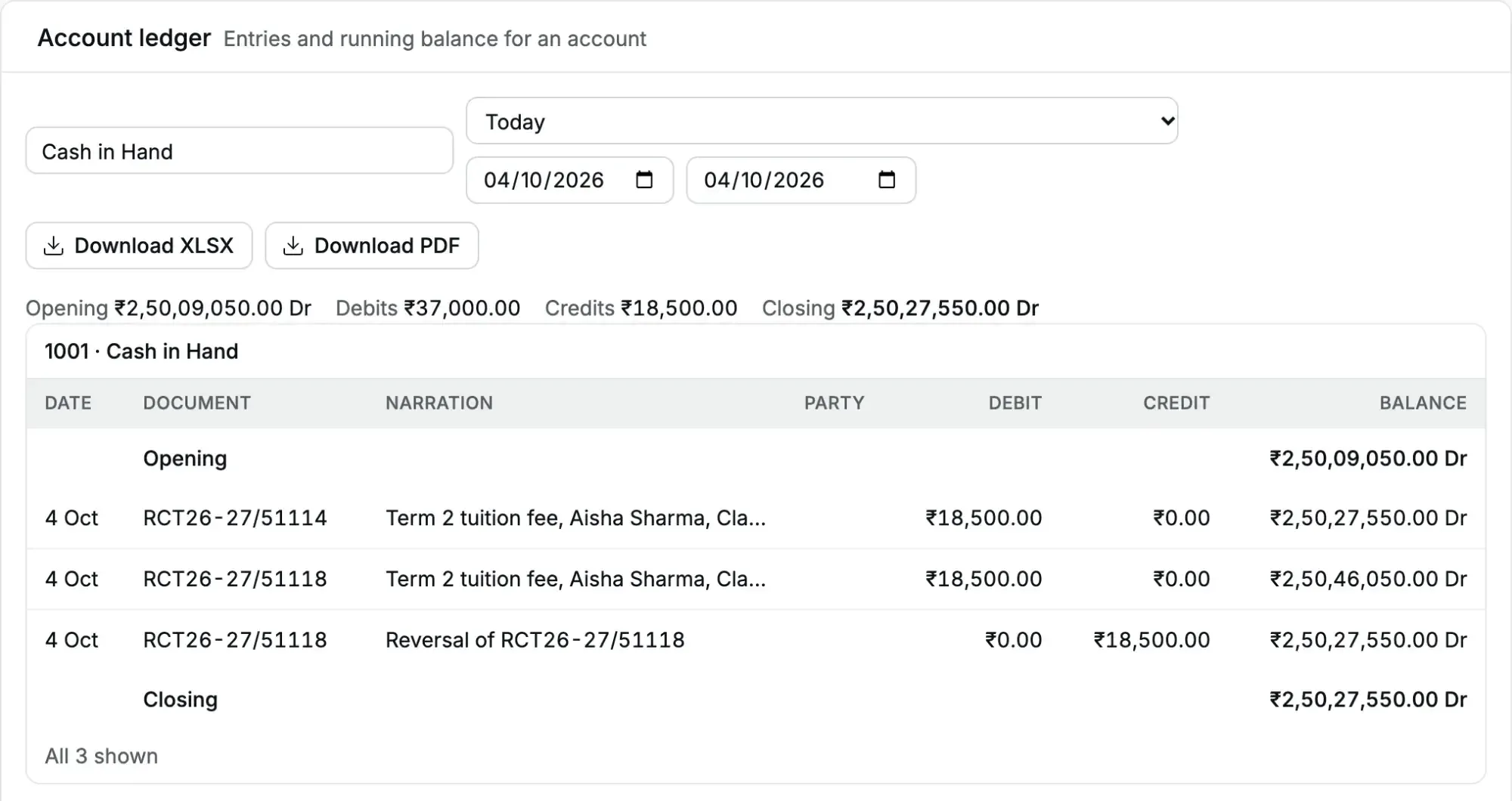
Open Reports, Account ledger (the ledger of one account), choose Cash in Hand and Today. Compare the movement with the cash in the drawer.
The day book shows seven entries: the six receipts in the register and the reversal. Debits and Credits are both ₹1,34,500.00: ₹96,000.00 for this page’s five receipts, ₹20,000.00 for Kavya Shetty’s receipt and ₹18,500.00 for the reversal. Each entry balances on its own.
The Cash in Hand ledger shows Debits ₹37,000.00 (the fee and the duplicate) and Credits ₹18,500.00 (the reversal). The cash collected today is ₹18,500.00, which must match the drawer.
Collections by method from this page’s receipts (add Kavya Shetty’s ₹20,000.00 UPI for the whole counter):
| Method | Account | Amount |
|---|---|---|
| Cash | Cash in Hand | ₹18,500.00 |
| HDFC UPI | HDFC Bank - Current | ₹18,500.00 |
| ICICI NEFT | ICICI Bank - Savings | ₹22,000.00 |
| HDFC NEFT (advance) | HDFC Bank - Current | ₹18,500.00 |
| Total | ₹77,500.00 |
The day book has no total per payment method. Filter the Receipts register by payment method, or open the ledger of each bank account for Today.
6. See the fee income
Open Reports, Profit and loss, and type 4 Oct 2026 in both dates.
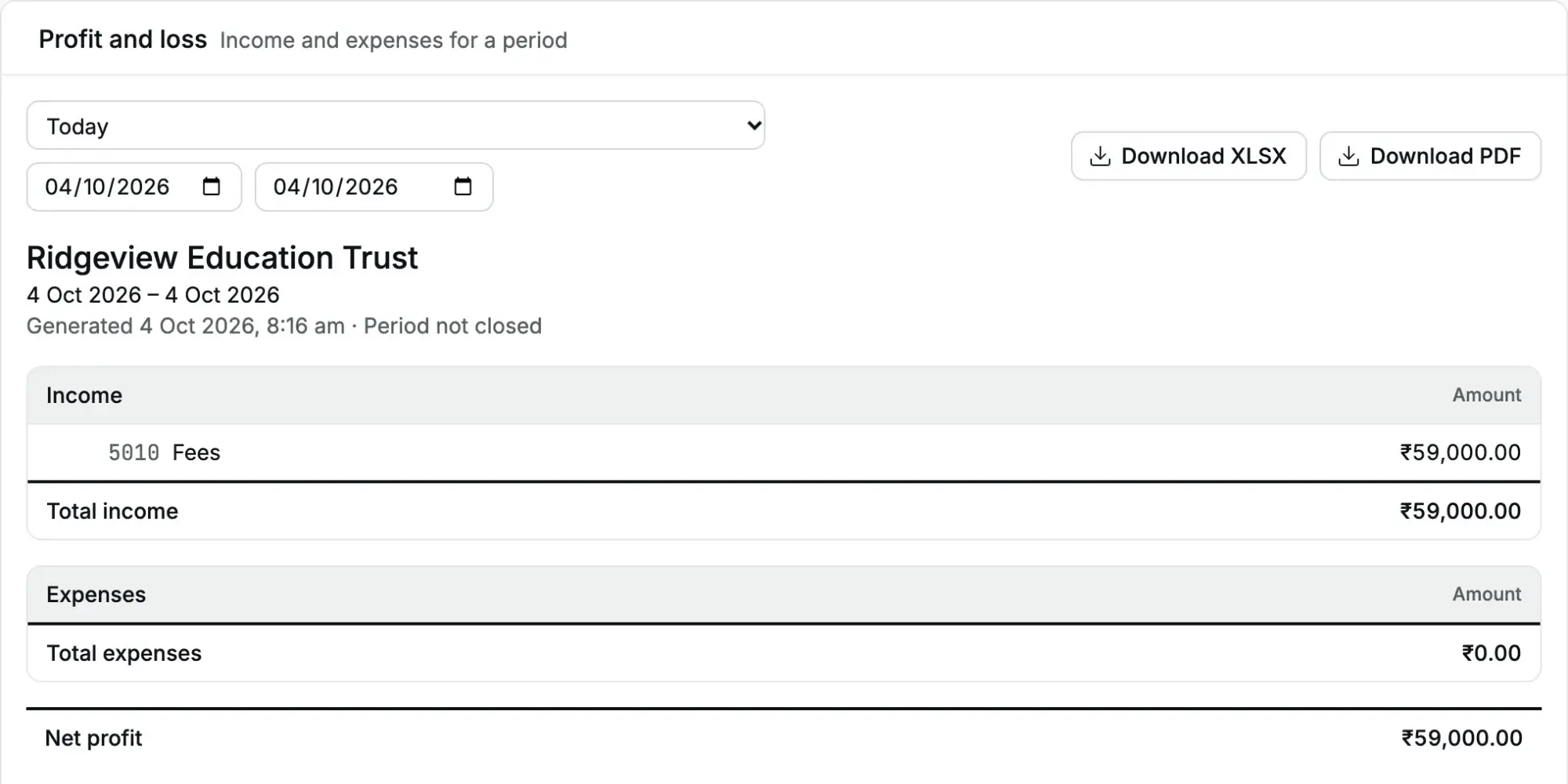
Fees shows ₹59,000.00: ₹18,500.00 + ₹18,500.00 + ₹22,000.00. The duplicate and its reversal cancel out. Deepa Reddy’s ₹18,500.00 is not income; it waits in Customer Advances.
Balances after the day
| Account | Change from these receipts |
|---|---|
| Cash in Hand | + ₹18,500.00 |
| HDFC Bank - Current | + ₹37,000.00 |
| ICICI Bank - Savings | + ₹22,000.00 |
| Customer Advances | + ₹18,500.00 (Cr) |
| Fees | + ₹59,000.00 (Cr) |
A note on parents’ statements
A Direct receipt goes straight to income, so it does not appear in the parent’s party ledger. To show a parent every payment, open the party and use the Transactions tab, which lists every receipt naming the parent. An advance does appear in the party ledger, because the school owes the parent until the term starts.