Party ledger
See one customer's or vendor's statement of account and send it as PDF or XLSX
The party ledger is the statement of account for one party, a customer or vendor. It lists every invoice, bill, receipt, payment, note and cancellation for the party, with a running balance. Send it to a customer to confirm what they owe, or to a vendor to agree your balances.
Question it answers: what does this party owe us, or what do we owe them, and how did the balance build up?
Who can open it: Owner, Accountant and Chartered Accountant. An operator (the desk role, see roles) does not see the Ledger tab.
Open a party ledger
Find the party
Click Parties and click the party’s name. The Balance column on the list already shows each party’s closing balance.
Open the Ledger tab
Choose the period
Click the period button and choose a preset, All time, or Custom range….
Read the ledger
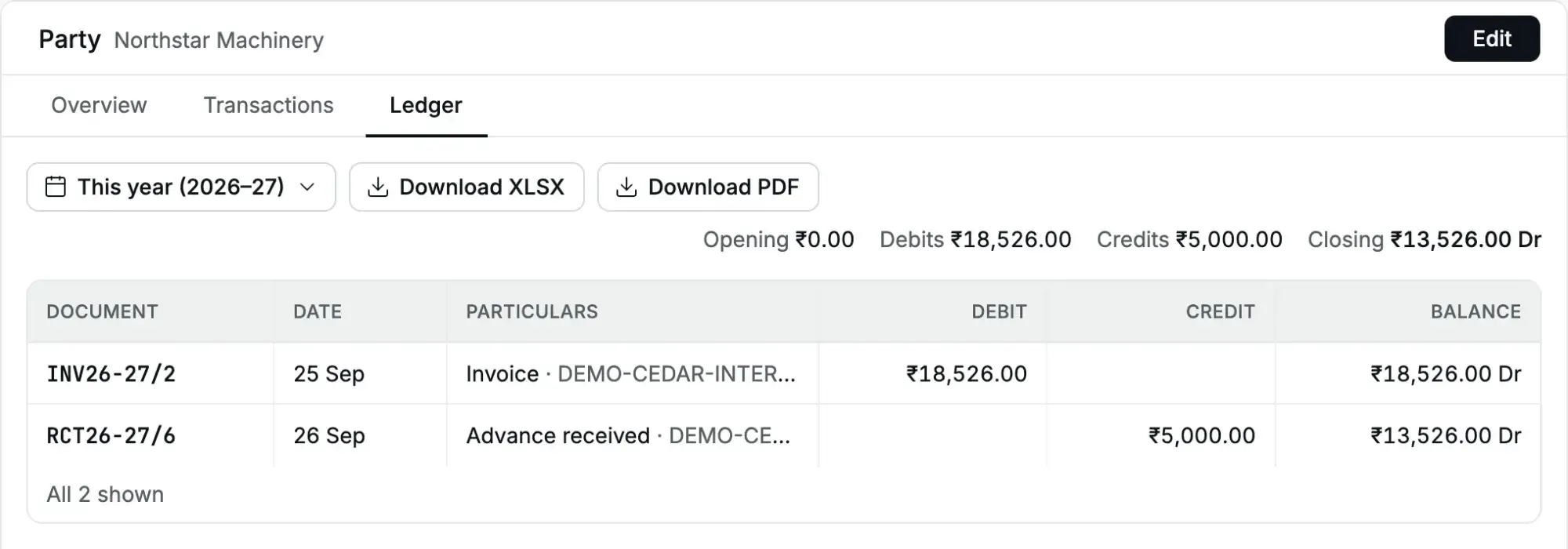
The figures above the table sum up the period:
| Figure | Meaning |
|---|---|
| Opening | The balance before the start date. It shows only when the period has a start date; All time has no opening. |
| Debits | Everything that increased what the party owes you |
| Credits | Everything that reduced it, or increased what you owe the party |
| Closing | The balance at the end of the period |
| Column | Meaning |
|---|---|
| Document | The document number. Click the row to open the document. Under it, the particulars: the kind of document, for example Invoice, Receipt, Credit note, Bill or Payment, followed by its reference. A receipt or payment kept as an advance reads “Advance received”. A cancellation reads “Cancellation”. |
| Date | The date of the entry |
| Debit, Credit | The amount |
| Balance | The running balance |
Dr (debit) means the party owes you. Cr means you owe the party, or you hold the party’s advance, money paid before the sale.
For a Bill with TDS, the particulars show the bill’s gross, the TDS deducted and the net payable, for example “Bill ₹10,000.00 − TDS ₹100.00 = ₹9,900.00”. A Debit Note that reverses TDS reads the same way, for example “Debit note ₹4,000.00 − TDS ₹40.00 = ₹3,960.00”. The Debit and Credit columns and the running balance use the net amount: gross minus TDS. A cancellation shows the reversed gross and TDS alongside its reversed net balance.
In the example, Cedar Components invoices Northstar Machinery ₹18,526.00 on 25 Sep 2026 (an interstate supply with IGST, the GST on sales between states). Northstar had paid ₹5,000.00 in advance on 26 Sep 2026. The ledger nets the two: Northstar owes ₹13,526.00 Dr.
One balance for both sides
A party that is both your customer and your vendor has one ledger. Invoices and payments to the party are debits; bills and receipts from the party are credits. The closing balance is the net amount.
Advances and allocations
An advance shows as a credit when you receive it. When you later apply the advance (an allocation) to an invoice, the ledger does not change: the party’s net balance stays the same. The allocation shows in the account ledger and the day book, where it moves the amount from Customer Advances to Accounts Receivable.
Cancelled documents
A cancelled document stays in the ledger on its date. A second row, “Cancellation”, reverses it (a reversal) on that same original date.
How it agrees with the books
The party ledger reads its own statement lines, not the journal. The figures still agree:
- A party’s closing balance equals the total of that party’s lines in four accounts: Accounts Receivable, Customer Advances, Accounts Payable and Supplier Advances, the control accounts that sum all parties. Check it in the account ledger, where each line names its party.
- The total of all party balances equals Accounts Receivable plus Supplier Advances, less Customer Advances and Accounts Payable, in the trial balance.
- Overdue payments on Home lists overdue invoices, bills and imported opening dues. Its total can differ from the ledger, which also carries amounts not yet due, advances and journals.
On 4 Oct 2026 Cedar Components’ parties net to ₹30,802.00 Dr. The trial balance gives the same figure: Accounts Receivable ₹73,302.00 Dr plus Supplier Advances ₹2,500.00 Dr, less Customer Advances ₹2,000.00 Cr and Accounts Payable ₹43,000.00 Cr.
Download a statement
- Print opens the party statement in its own tab, and Download PDF saves it. It shows your legal name and GSTIN (GST number), the period, and the party’s name, address and state code, then every line with its date, document, particulars, debit, credit and balance. Send it to the party. It holds up to 5,000 lines; above that it shows “This report exceeds 5,000 lines; choose a shorter period.” Choose a shorter period, or use Download Excel, which holds up to 1,00,000 lines.
- Download Excel saves the same statement as a workbook, with the party’s name, GSTIN, address and state code at the top. For a bill with TDS, the column Bill amount before TDS holds the gross. It needs the export grant.
For All time, the statement runs up to today and its Opening row shows ₹0.00. The screen hides the Opening figure for All time.
Common questions
The ledger says “No ledger entries”. Nothing was posted for this party in the period. Draft invoices and bills do not appear until you post them.
The closing balance differs from the invoice’s outstanding. The ledger nets advances and credit notes that are not yet applied to the invoice. Use Apply credit to match them.