Trial balance
Check that the books balance and see every account's opening, movement and closing balance for a period
The trial balance lists every account that has a balance or a movement in the period. For each account it shows the opening balance, the debits and credits (the two equal sides of every entry) in the period, and the closing balance. Debits always equal credits, so the trial balance is the first report to open when you close a month or hand the books to your CA (Chartered Accountant).
Question it answers: do the books balance, and what is the balance of each account?
Who can open it: Owner, Accountant and Chartered Accountant. Download Excel needs the export grant, which these three roles hold.
Open the trial balance
Open the report
Click Reports, then Trial balance. The report opens for This month. This year is your financial year: 1 April to 31 March, or the twelve months from the start month your organization chose.
Choose the period
Choose a preset from the date filter, or pick dates in Custom range and click Apply. For a month-end review of September, choose Last month in October, or pick 1 Sep 2026 and 30 Sep 2026.
Read the totals
Scroll to the Total row. Opening, period and closing totals each balance.
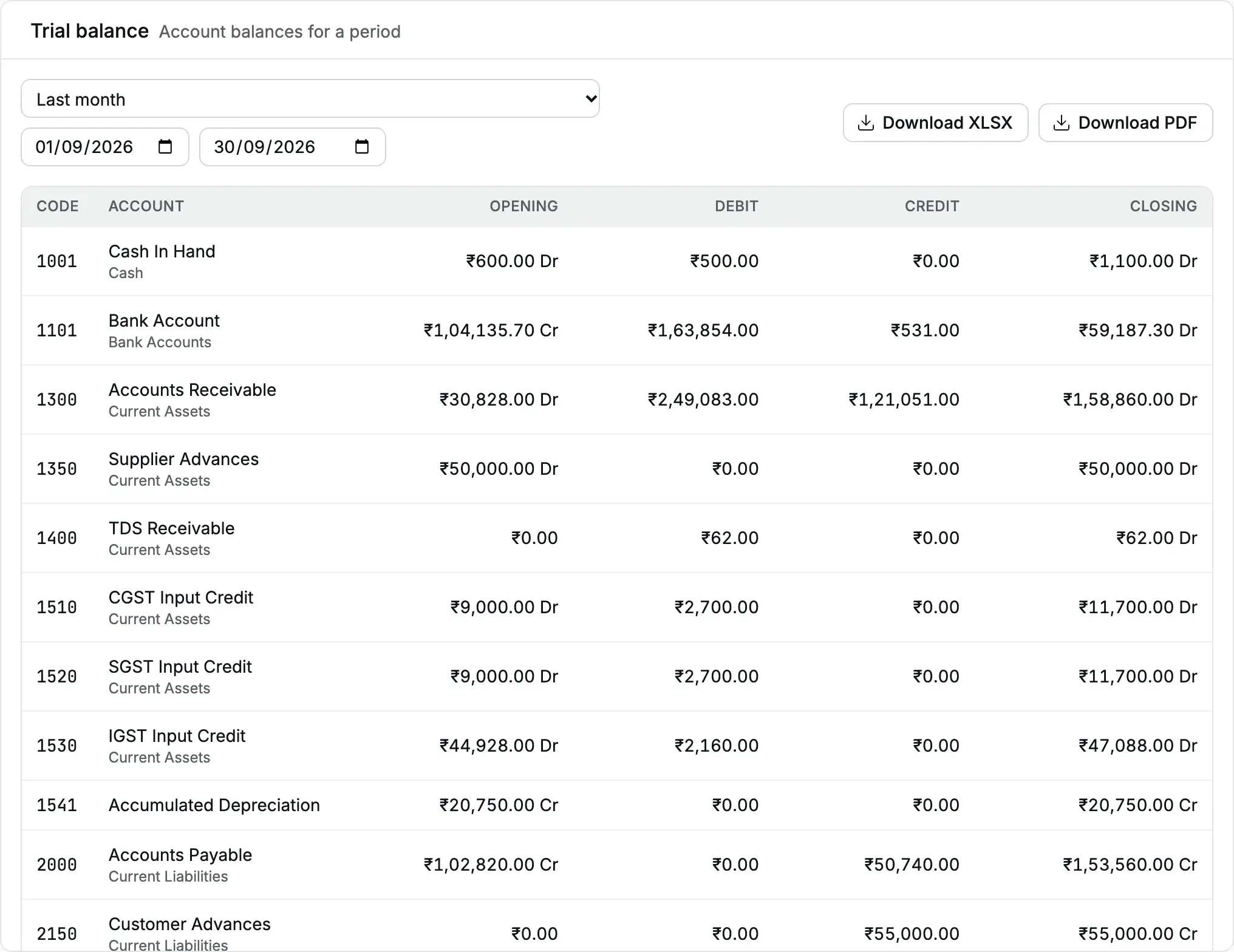
Read each column
| Column | Meaning |
|---|---|
| Code | The account code from the chart of accounts, the list of all your accounts. Rows sort by code. |
| Account | The account name. The smaller line below it names its group, a heading that holds accounts, for example “Current Assets”. “· Inactive” follows an archived account. |
| Opening | The balance before the From date: every line dated earlier, the Opening Balance (balances brought in from your old books) included. Dr when debits are larger, Cr when credits are larger. |
| Debit | The total of debits dated inside the period. |
| Credit | The total of credits dated inside the period. |
| Closing | Opening plus debits minus credits, shown Dr or Cr. |
Only posting accounts (leaf accounts that take entries) appear, never groups. An account with no opening balance and no movement in the period does not appear.
In the September example, Accounts Receivable (the receivable control account: what customers owe) opens at ₹30,828.00 Dr (the invoice of 19 Aug to Kaveri Engineering Works). In September Cedar Components invoices ₹2,49,083.00 and collects or credits ₹1,21,051.00, so the closing balance is ₹30,828.00 + ₹2,49,083.00 − ₹1,21,051.00 = ₹1,58,860.00 Dr.
Bank Account opens September at ₹1,04,135.70 Cr: on 1 Sep the books show the bank overdrawn. A balance on the unusual side keeps its Dr or Cr label, so check such a line first when you review a month.
The Total row
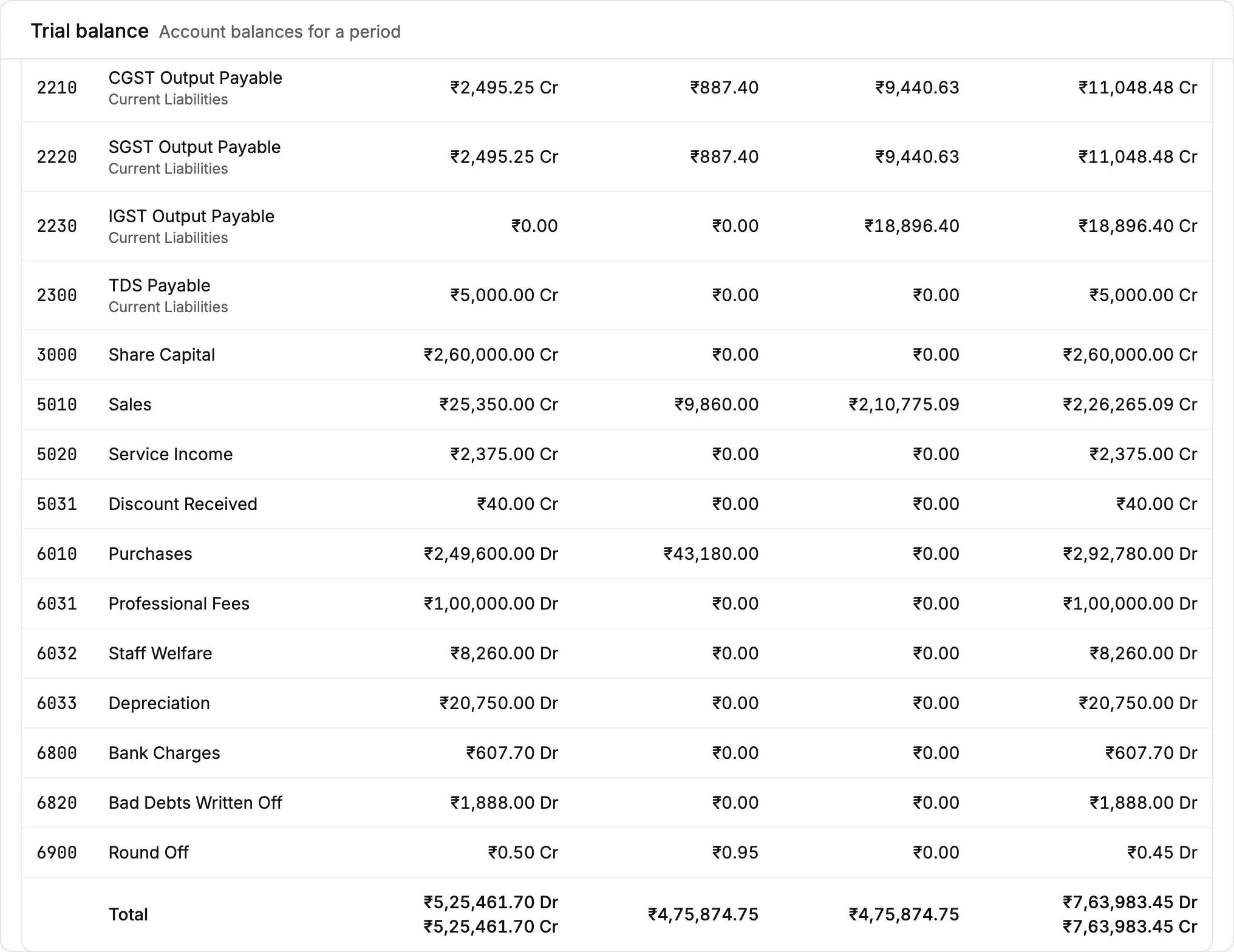
The Total row shows two figures under Opening and Closing: the sum of all Dr balances and the sum of all Cr balances. Under Debit and Credit it shows the total movement in the period.
| Total | September 2026 |
|---|---|
| Opening | ₹5,25,461.70 Dr and ₹5,25,461.70 Cr |
| Period | ₹4,75,874.75 debit and ₹4,75,874.75 credit |
| Closing | ₹7,63,983.45 Dr and ₹7,63,983.45 Cr |
Every posted document balances, so these pairs are always equal. Edernal Books never shows a “difference” row. If the totals ever disagreed, the report would not load and would show “Could not load trial balance”. Tell your administrator at once, because it means a data error.
Opening balances and the financial year
The opening is the running total of every earlier line. It does not restart when a new financial year begins. Income and expense accounts therefore carry an opening into a new financial year. For example, the trial balance for 1 Sep to 30 Sep shows Sales with an opening of ₹25,350.00 Cr, the sales from 1 April to 31 August.
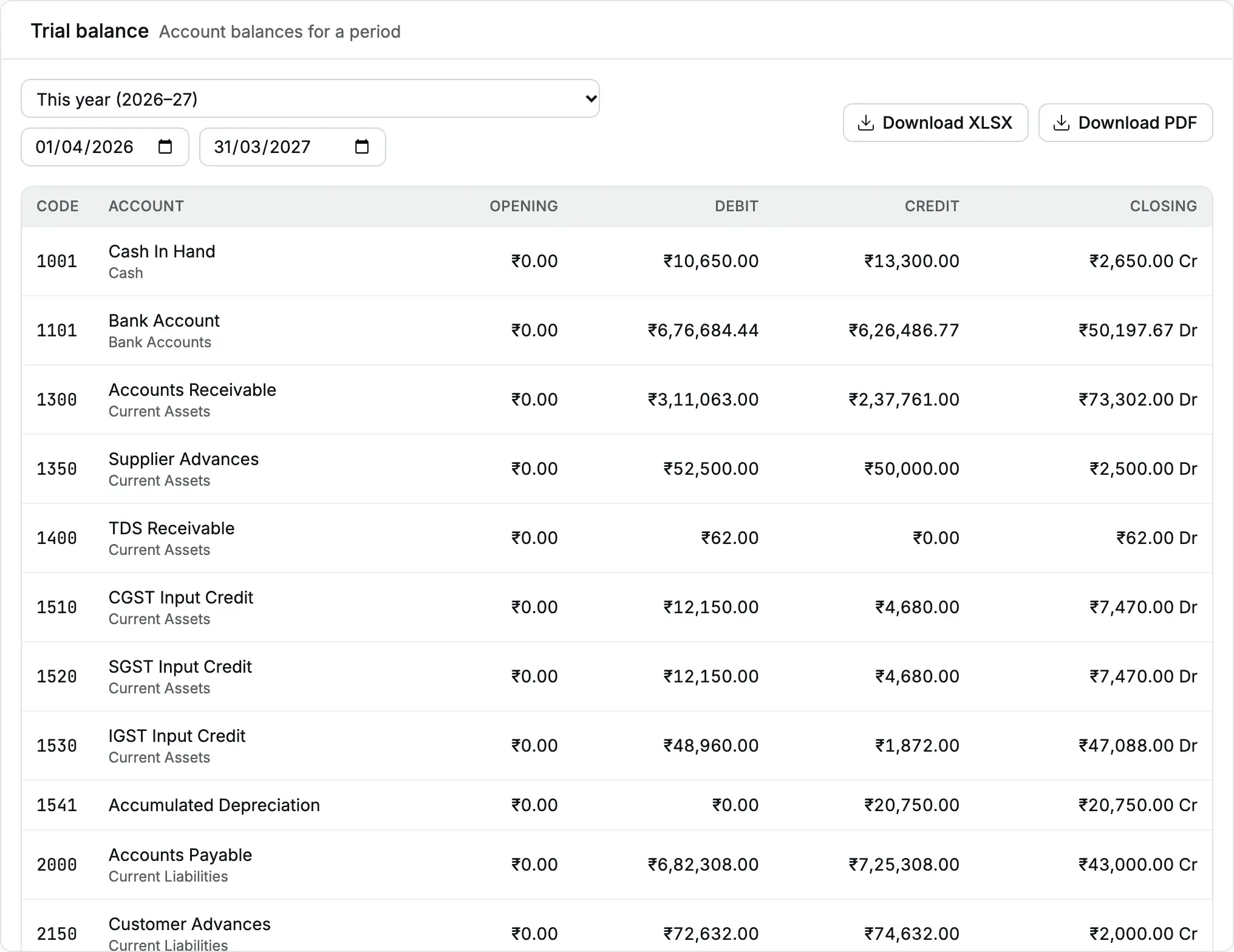
When you open the trial balance for This year and your Opening Balance is dated inside the year, the Opening column shows ₹0.00 and the Opening Balance appears in the Debit and Credit columns. For example, an opening of Share Capital ₹2,60,000.00 dated inside the selected financial year appears as a credit in the period. To see it as an opening, start the period after the Opening Balance date.
Drill down to the entries
Click an account name. The account ledger, the ledger of one account, opens for the same account and the same period. Its closing balance equals the trial balance’s Closing for that account. From the ledger, click a document number to open the document.
Cancelled documents
When you cancel a document, Edernal Books keeps the original entry and posts a reversal, an equal and opposite entry, on that same document date. Both entries appear in the original month’s trial balance and cancel out, even if you cancel later. A locked original date blocks cancellation unless the applicable lock is reopened or a books-lock exception applies.
On a phone
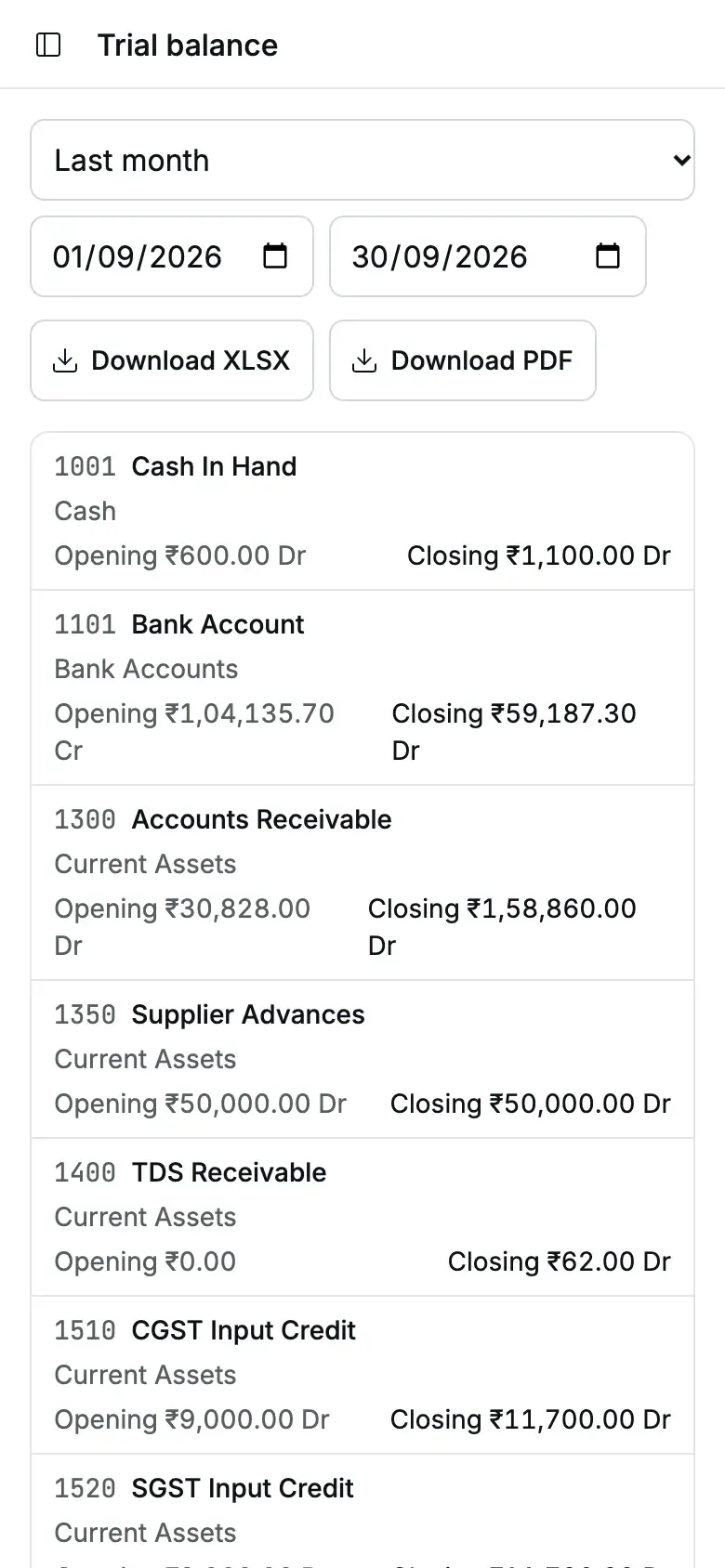
On a narrow screen each account is a card with its code, name, group, opening and closing balance. The debit and credit columns are not shown. Use a computer or the download when you need them.
Download
- Download Excel saves a file named like
trial-balance-2026-04-01-2026-06-30.xlsx. It has separate columns for Opening Dr, Opening Cr, Debit, Credit, Closing Dr and Closing Cr, a Group column, and a Total row. - Print opens the PDF in its own tab. Download PDF saves it. Each line shows the account and its group, then the same five amounts as the screen.
Both carry your legal name, GSTIN (in the PDF), the period and the time it was generated.
Common questions
An account I expected is missing. It has no opening balance and no entries in the period. Widen the period, or open the account ledger for it.
The trial balance does not show an organization header. The screen shows only the table. The PDF and the XLSX carry the full header.
A document posted today is not in the report. Check its date. The trial balance reads the document date, not the day you posted it.