Profit and loss
See income, expenses and the net profit or loss for any period
The profit and loss (P&L) statement shows what the business earned and spent in a period, and the difference: the net profit or the net loss.
Question it answers: did the business make money in this period, and where did it come from and go?
Who can open it: Owner, Accountant and Chartered Accountant.
Open the profit and loss
Open the report
Click Reports, then Profit and loss. The report opens for This month. This year is your financial year: 1 April to 31 March, or the twelve months from the start month your organization chose.
Choose the period
Choose This month, Last month, This year or Last year, or pick dates in Custom range and click Apply. Both dates are included.
Read the result
Read Total income, Total expenses and the last line, Net profit or Net loss.
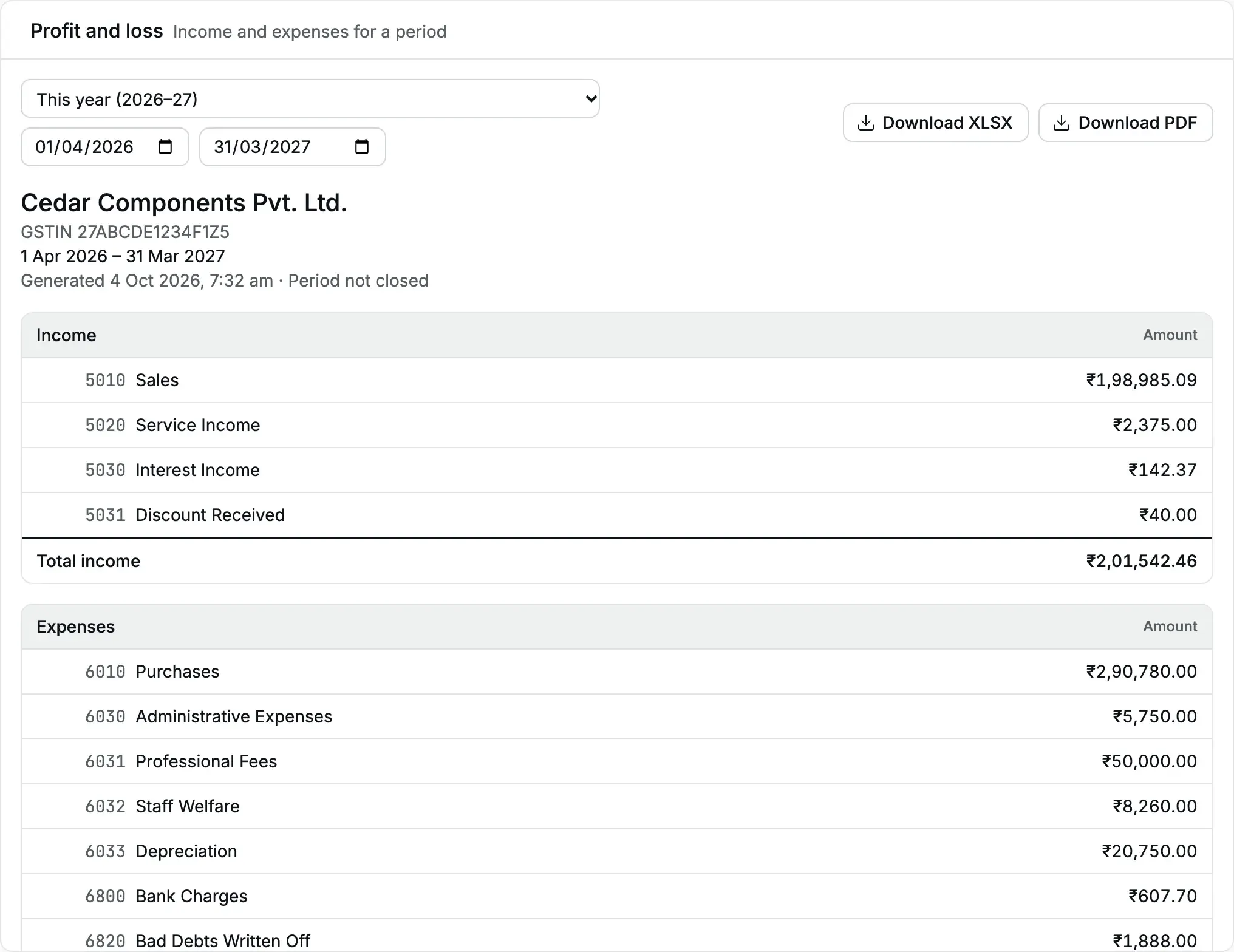
Read the statement
The header names your organization, its GSTIN (GST registration number), the period and the time the report was generated.
| Section | What it holds | How the amount is worked out |
|---|---|---|
| Income | Every income account with movement in the period | Credits less debits (debit and credit) |
| Expenses | Every expense account with movement in the period | Debits less credits |
| Net profit / Net loss | Total income less total expenses | Shown as Net loss with the figure in brackets when expenses are larger |
Accounts appear under the groups (headings that hold accounts) of your chart of accounts. A group shows the total of the accounts under it. Click the arrow next to a group to collapse or expand it. Accounts and groups with no movement in the period do not appear.
An amount in brackets is negative. A net loss shows in brackets, and so does an expense account whose credits are larger than its debits in the period.
For Cedar Components from 1 Apr 2026 to 4 Oct 2026:
| Line | Amount |
|---|---|
| Sales | ₹1,98,985.09 |
| Service Income | ₹2,375.00 |
| Interest Income | ₹142.37 |
| Discount Received | ₹40.00 |
| Total income | ₹2,01,542.46 |
| Purchases | ₹2,90,780.00 |
| Administrative Expenses | ₹5,750.00 |
| Professional Fees | ₹50,000.00 |
| Staff Welfare | ₹8,260.00 |
| Depreciation | ₹20,750.00 |
| Bank Charges | ₹607.70 |
| Bad Debts Written Off | ₹1,888.00 |
| Round Off | ₹0.05 |
| Total expenses | ₹3,78,035.75 |
| Net loss | (₹1,76,493.29) |
Expenses are larger than income, so the last line reads Net loss. This example books purchases directly to expense accounts. With stock tracking, a Bill puts the goods’ cost in Stock; selling them moves that cost to Cost of Goods Sold. Unsold tracked goods stay on the balance sheet. Bad Debts Written Off is a write-off: an invoice you gave up collecting.
The same (₹1,76,493.29) appears on the balance sheet of that day as Profit and loss, period when both reports use the same dates.
What the statement includes
- Only posted documents. Draft invoices and bills (saved, not yet posted) are not in the books.
- Sales and purchases at their taxable value. Output GST (tax you charge) and eligible input GST (tax you may reclaim) sit in the tax accounts on the balance sheet, not in the profit and loss.
- A sales return (credit note) as a debit to Sales, so it reduces income.
- A cancelled document in two places: the original and its reversal (the undoing entry) on the same original date. Cancelling a September Direct receipt in October removes its income from September, not October. A locked original date blocks cancellation unless the applicable lock is reopened or a books-lock exception applies. Cancelling an advance or a receipt against an invoice does not touch income at all.
Drill down
Click any account name. The account ledger opens for that account and the same period. Group names are not links; expand the group and click an account inside it.
Download
- Download Excel saves the statement with income, expense and total rows, groups indented, and a last row Net profit / loss.
- Print opens a PDF with the same header and lines in its own tab. Download PDF saves that PDF.
Common questions
The statement says “No income or expense activity in this period.” No income or expense account has a net movement in the period. Either nothing touched those accounts, or entries cancelled each other out, for example a receipt and its reversal in the same month. Check the dates, then open the day book for the period to see any such pairs.
Income fell in a past month. A cancellation reverses income on the document’s original date, so it lowers the month the document belongs to. Open the day book for the month and filter by document type to find the reversals.